


Skip to content
View in the app

A better way to browse. Learn more.

RenoTalk.com ™

A full-screen app on your home screen with push notifications, badges and more.

To install this app on iOS and iPadOS
  1. Tap the Share icon in Safari
  2. Scroll the menu and tap Add to Home Screen.
  3. Tap Add in the top-right corner.
To install this app on Android
  1. Tap the 3-dot menu (⋮) in the top-right corner of the browser.
  2. Tap Add to Home screen or Install app.
  3. Confirm by tapping Install.

eleous

Members
  • Joined

  • Last visited

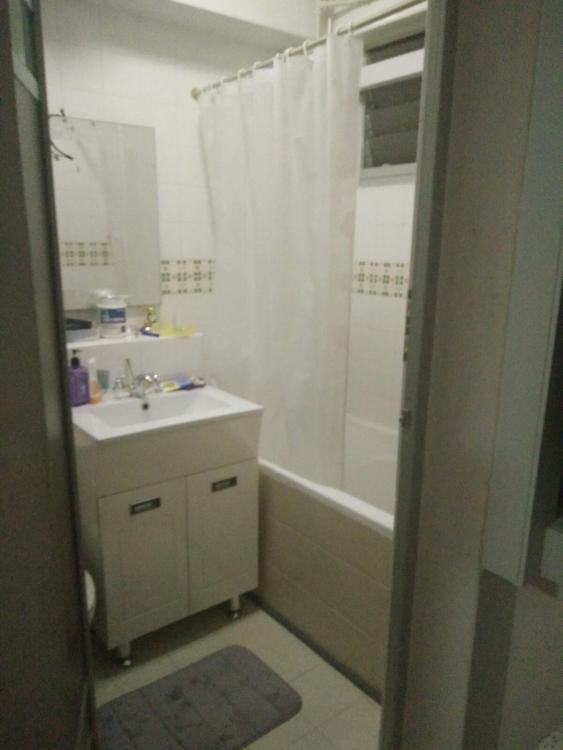
  1. hi everyone i need some advise.. my husband and i got a resale flat and this is the picture of the toilet.. we actually are quite ok with the bathtub and sink etc but we do not like the green tiles are surrounds the toilet. any ideas to remove it. i know we can hack and retile, but that will be very pricey and we are looking for ways to save on reno cost. some frens mentioned that i can do a half tile/half paint but would paint be ok for the bathroom? thank you for your inputs
Account

Navigation

Search

Search

Configure browser push notifications

Chrome (Android)
  1. Tap the lock icon next to the address bar.
  2. Tap Permissions → Notifications.
  3. Adjust your preference.
Chrome (Desktop)
  1. Click the padlock icon in the address bar.
  2. Select Site settings.
  3. Find Notifications and adjust your preference.