


Skip to content
View in the app

A better way to browse. Learn more.

RenoTalk.com ™

A full-screen app on your home screen with push notifications, badges and more.

To install this app on iOS and iPadOS
  1. Tap the Share icon in Safari
  2. Scroll the menu and tap Add to Home Screen.
  3. Tap Add in the top-right corner.
To install this app on Android
  1. Tap the 3-dot menu (⋮) in the top-right corner of the browser.
  2. Tap Add to Home screen or Install app.
  3. Confirm by tapping Install.

xiaoyuanyuan

Members
  • Joined

  • Last visited

Everything posted by xiaoyuanyuan

  1. If I don't wish to install a gate, any recommendation on the type of locks to use?
  2. The current gate is a 2-door main gate. If I were to fix one end, the other side will not open fully due to the meter box. Any suggestions?
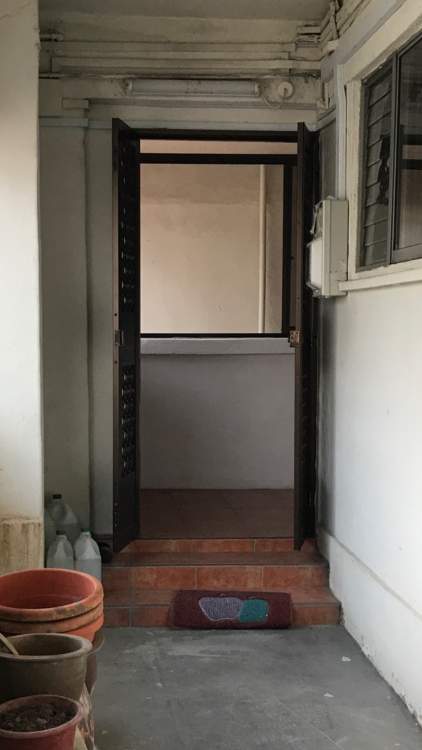
  3. I am currently renovating my resale flat. The main gate is partially opened as it was blocked by the PUB electrical meter box. Therefore, I decided to do away with the main gate. Anyone stays in a flat without a main gate? How do you secure your home? What kind / types of locks are you using for the main door? Looking forward to your recommendation. Thanks.

Account

Navigation

Search

Search

Configure browser push notifications

Chrome (Android)
  1. Tap the lock icon next to the address bar.
  2. Tap Permissions → Notifications.
  3. Adjust your preference.
Chrome (Desktop)
  1. Click the padlock icon in the address bar.
  2. Select Site settings.
  3. Find Notifications and adjust your preference.