


Skip to content
View in the app

A better way to browse. Learn more.

RenoTalk.com ™

A full-screen app on your home screen with push notifications, badges and more.

To install this app on iOS and iPadOS
  1. Tap the Share icon in Safari
  2. Scroll the menu and tap Add to Home Screen.
  3. Tap Add in the top-right corner.
To install this app on Android
  1. Tap the 3-dot menu (⋮) in the top-right corner of the browser.
  2. Tap Add to Home screen or Install app.
  3. Confirm by tapping Install.

stevensp

Members
  • Joined

  • Last visited

Everything posted by stevensp

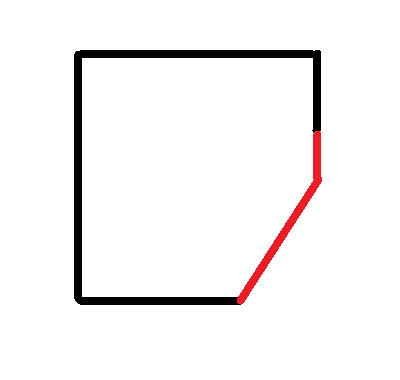
  1. My bathroom originally comes with shower glass door. We dismantled the glass door due to accessibility issues. So instead of fixing a glass door, I am thinking of installing a shower curtain to prevent the water from splashing out. I have attached a picture of my bathroom. The black lines are the walls and the red lines were where the shower glass door was. The problem now is...where to find or fabricate such a rod?
  2. Not sure this have been solved. but I opened it by inserting a screw driver into the holes and turned it clockwise.
  3. Is there any pump we can install?

Account

Navigation

Search

Search

Configure browser push notifications

Chrome (Android)
  1. Tap the lock icon next to the address bar.
  2. Tap Permissions → Notifications.
  3. Adjust your preference.
Chrome (Desktop)
  1. Click the padlock icon in the address bar.
  2. Select Site settings.
  3. Find Notifications and adjust your preference.