


Skip to content
View in the app

A better way to browse. Learn more.

RenoTalk.com ™

A full-screen app on your home screen with push notifications, badges and more.

To install this app on iOS and iPadOS
  1. Tap the Share icon in Safari
  2. Scroll the menu and tap Add to Home Screen.
  3. Tap Add in the top-right corner.
To install this app on Android
  1. Tap the 3-dot menu (⋮) in the top-right corner of the browser.
  2. Tap Add to Home screen or Install app.
  3. Confirm by tapping Install.

Js27

Members
  • Joined

  • Last visited

Everything posted by Js27

  1. Crystal Glass on sale. Drinking Glass/ wine glass/ shot glass. let me know which type of Crystal Glass are you looking for ! ! !
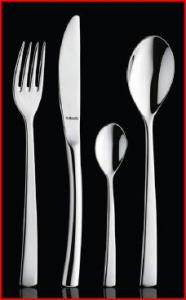
  2. Hi Guys, My company is dealing with 5 star hotel grade cutleries. we are now clearing some stock to bring in the new ones. If you are looking for some cutleries. do drop PM me. and i can sent you the images and price.
  3. Hello Guys ! I'm collecting my KEYS soon for my NEW BTO flat. Anything i really need to check when i collcted the keys? please advise... thank you so much !
  4. HI Guys, Does anyone of you interested in these kind of LED Lights... Cos i intend to do a group buy if the respond is gd..... http://www.smartandgreen.eu/en/] IF u guys are keen please PM me. thanx thanx...
Account

Navigation

Search

Search

Configure browser push notifications

Chrome (Android)
  1. Tap the lock icon next to the address bar.
  2. Tap Permissions → Notifications.
  3. Adjust your preference.
Chrome (Desktop)
  1. Click the padlock icon in the address bar.
  2. Select Site settings.
  3. Find Notifications and adjust your preference.