



Skip to content
View in the app

A better way to browse. Learn more.

RenoTalk.com ™

A full-screen app on your home screen with push notifications, badges and more.

To install this app on iOS and iPadOS
  1. Tap the Share icon in Safari
  2. Scroll the menu and tap Add to Home Screen.
  3. Tap Add in the top-right corner.
To install this app on Android
  1. Tap the 3-dot menu (⋮) in the top-right corner of the browser.
  2. Tap Add to Home screen or Install app.
  3. Confirm by tapping Install.

kokinan

Members
  • Joined

  • Last visited

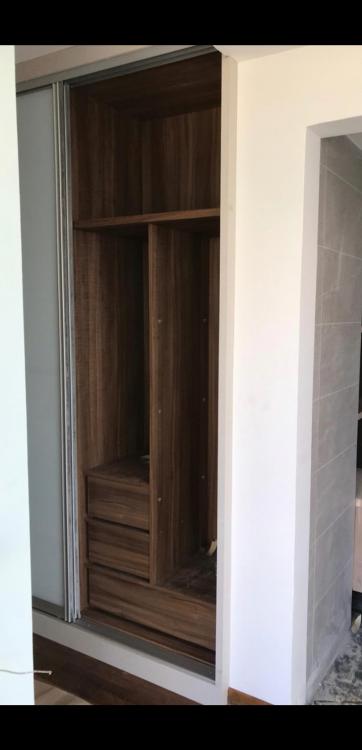
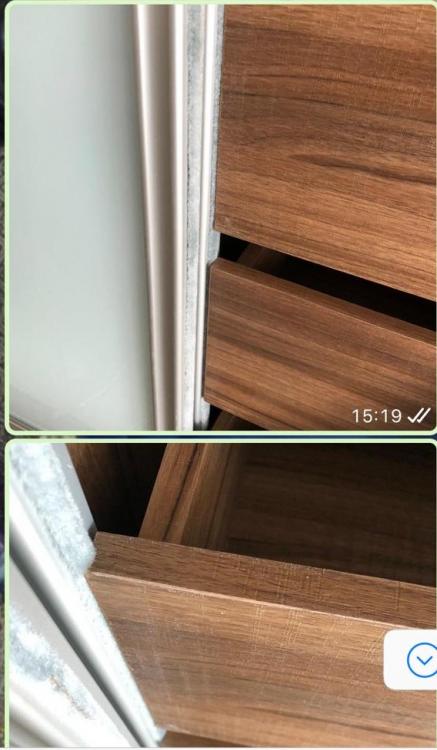
  1. Recently engaged an ID to do up my house. And this is the sliding door wardrobe that done up by the ID, please see the attached photo. I was so ferious when I saw this. I welcome any comment.
  2. Hi Jerome can quot me the price for the EF 2 zone induction hob HB BI 290 T
  3. Hi Ben, it looks cool from Ferroli website, how much did you buy? Good for how many room and pax?
  4. Has anyone using Tankless Water Heater ? It seems cool and space saving as compare to conventional instance or storage tank water heater. It can serve up to 2 or 3 bathrooms. Please see link : http://www.homedepot.com/webapp/catalog/servlet/ContentView?pn=BP_Rheem
Account

Navigation

Search

Search

Configure browser push notifications

Chrome (Android)
  1. Tap the lock icon next to the address bar.
  2. Tap Permissions → Notifications.
  3. Adjust your preference.
Chrome (Desktop)
  1. Click the padlock icon in the address bar.
  2. Select Site settings.
  3. Find Notifications and adjust your preference.