


Skip to content
View in the app

A better way to browse. Learn more.

RenoTalk.com ™

A full-screen app on your home screen with push notifications, badges and more.

To install this app on iOS and iPadOS
  1. Tap the Share icon in Safari
  2. Scroll the menu and tap Add to Home Screen.
  3. Tap Add in the top-right corner.
To install this app on Android
  1. Tap the 3-dot menu (⋮) in the top-right corner of the browser.
  2. Tap Add to Home screen or Install app.
  3. Confirm by tapping Install.

Craz03

Members
  • Joined

  • Last visited

Everything posted by Craz03

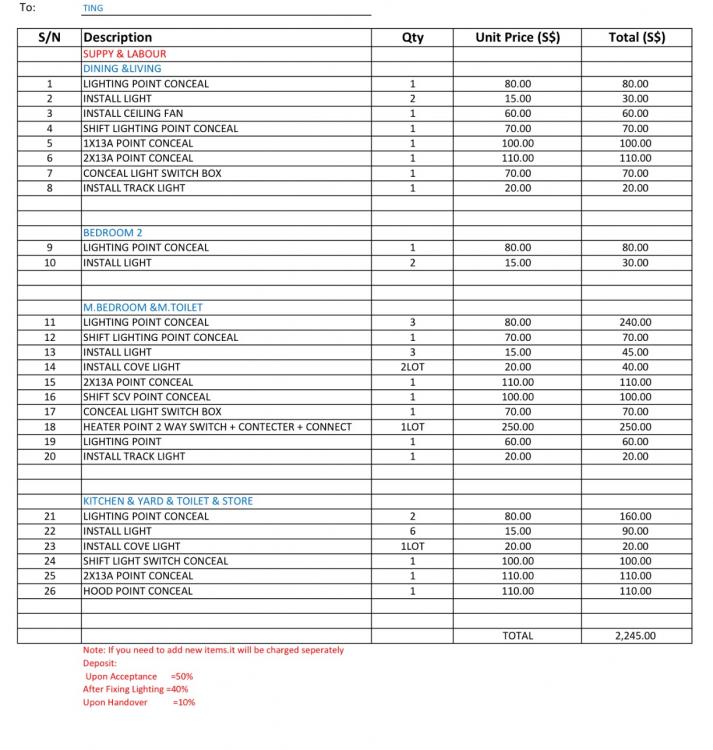
  1. Just took my keys to the new bto 3 rm n this is wat my id electrician quoted me for concealed lightings n installation charges i feel I got kinda rip off ... Haven agreed yet Anyone got good Electricians contacts to pass me instead? I understand that the standard rates r at least 25-30% cheaper from the topics I surf here.. Many thanks in advance
Account

Navigation

Search

Search

Configure browser push notifications

Chrome (Android)
  1. Tap the lock icon next to the address bar.
  2. Tap Permissions → Notifications.
  3. Adjust your preference.
Chrome (Desktop)
  1. Click the padlock icon in the address bar.
  2. Select Site settings.
  3. Find Notifications and adjust your preference.