Skip to content
View in the app

A better way to browse. Learn more.

RenoTalk.com ™

A full-screen app on your home screen with push notifications, badges and more.

To install this app on iOS and iPadOS
  1. Tap the Share icon in Safari
  2. Scroll the menu and tap Add to Home Screen.
  3. Tap Add in the top-right corner.
To install this app on Android
  1. Tap the 3-dot menu (⋮) in the top-right corner of the browser.
  2. Tap Add to Home screen or Install app.
  3. Confirm by tapping Install.

VictoriaTan

Members
  • Joined

  • Last visited

Everything posted by VictoriaTan

  1. Hi Jerome, Please quote us for the following. Thanks. 1) Storage heater - Joven JH25 2) Oven - Brandt FE1022XS 3) Hood - Brandt AT1490X 4) Hob - TG1483B Thanks alot.
  2. Hello! Any one has any experiences with the mentioned IDs? 1) Weiken 2) Aartboxx 3) Diamon'tifs 4) Kdot Have received quotes from them but not sure reliability and carpentry or contractor works. Thanks!
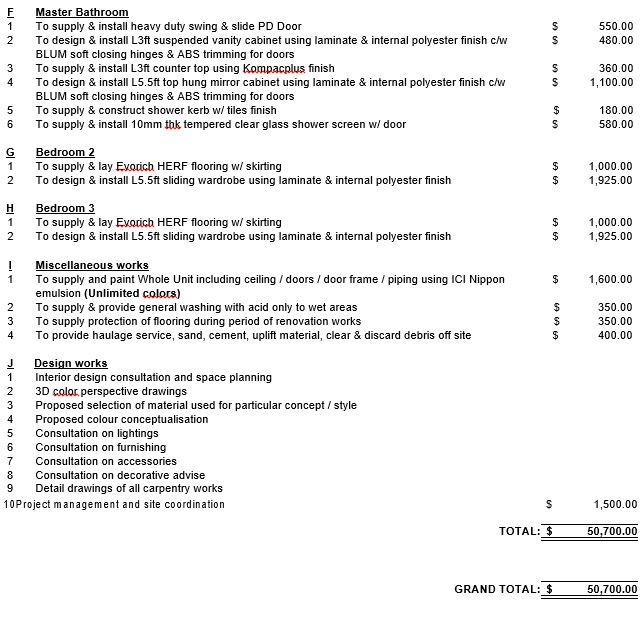
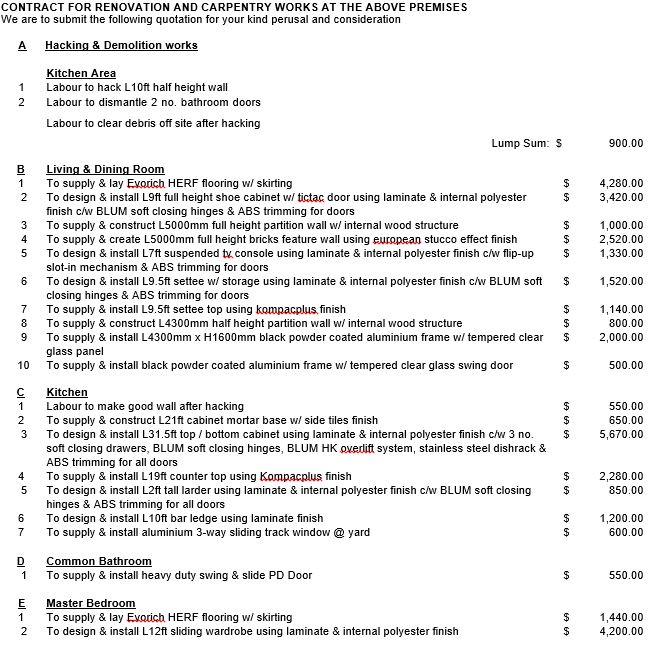
  3. Hi Everyone! Need your feedback on this reno quote from an ID. As a first-time homeowners, hope you guys can comment what need and what not? Is the rate overpriced for some items? New home is 5rm BTO 113sqm Thanks!

Account

Navigation

Search

Search

Configure browser push notifications

Chrome (Android)
  1. Tap the lock icon next to the address bar.
  2. Tap Permissions → Notifications.
  3. Adjust your preference.
Chrome (Desktop)
  1. Click the padlock icon in the address bar.
  2. Select Site settings.
  3. Find Notifications and adjust your preference.