



Skip to content
View in the app

A better way to browse. Learn more.

RenoTalk.com ™

A full-screen app on your home screen with push notifications, badges and more.

To install this app on iOS and iPadOS
  1. Tap the Share icon in Safari
  2. Scroll the menu and tap Add to Home Screen.
  3. Tap Add in the top-right corner.
To install this app on Android
  1. Tap the 3-dot menu (⋮) in the top-right corner of the browser.
  2. Tap Add to Home screen or Install app.
  3. Confirm by tapping Install.

Amos Tay

Members
  • Joined

  • Last visited

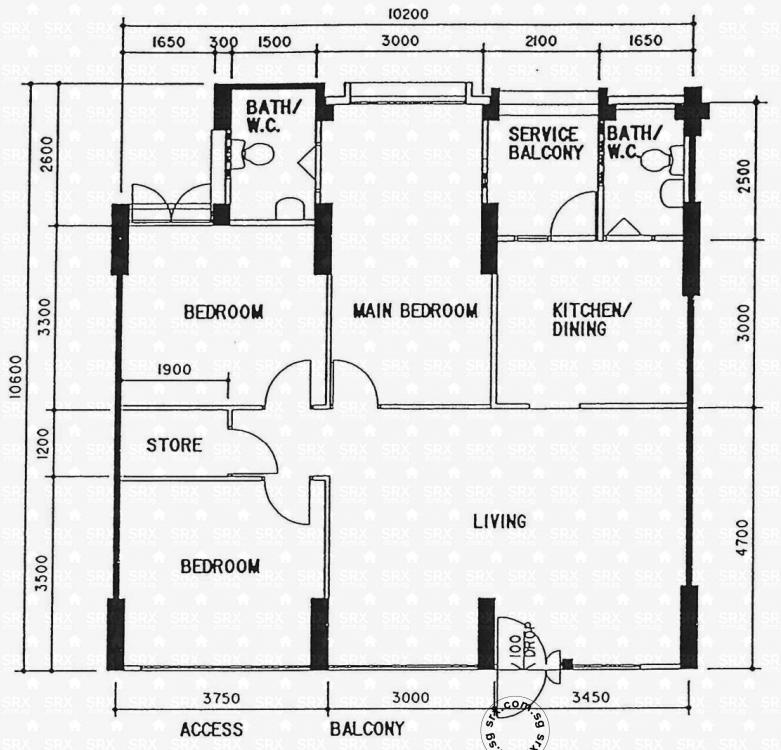
  1. Hi all, am currently staying in a 4A HDB flat with my mom in Serangoon North area, Planning to do a revamp of the whole house, probably hacking away the storeroom. Did not manage to find any related design ideas for our specific layout. Mainly looking to maximize space and lighting. Below is the original floor plan. The only thing my mom did was to remove the door to the service balcony and shifted the toilet door to the other corner as in the 2nd floor plan below.
Account

Navigation

Search

Search

Configure browser push notifications

Chrome (Android)
  1. Tap the lock icon next to the address bar.
  2. Tap Permissions → Notifications.
  3. Adjust your preference.
Chrome (Desktop)
  1. Click the padlock icon in the address bar.
  2. Select Site settings.
  3. Find Notifications and adjust your preference.