



Skip to content
View in the app

A better way to browse. Learn more.

RenoTalk.com ™

A full-screen app on your home screen with push notifications, badges and more.

To install this app on iOS and iPadOS
  1. Tap the Share icon in Safari
  2. Scroll the menu and tap Add to Home Screen.
  3. Tap Add in the top-right corner.
To install this app on Android
  1. Tap the 3-dot menu (⋮) in the top-right corner of the browser.
  2. Tap Add to Home screen or Install app.
  3. Confirm by tapping Install.

Nurriana

Members
  • Joined

  • Last visited

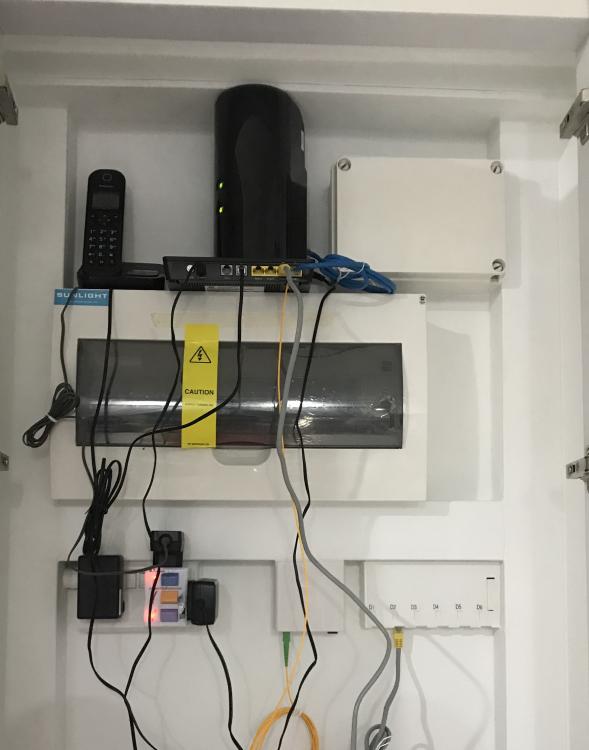
  1. Hi everyone, I move in to a new bto and all phone point in every room and hall are data point too.My problem is all my router,open network terminal are in the box like cabinet in my hallway next to the door.I have sign up with starhub to have fible tv,wifi and digital line.I just realised today after buying a cordless phone that my phone need to be connected to the ont which is in the cabinet together with my router.(The terminal point is build in the cabinet by hdb) It doesnt make sense to have my phone in the cabinet right.How do i shift my cordless phone from the cabinet to living room? Thank you in advance! Riana
Account

Navigation

Search

Search

Configure browser push notifications

Chrome (Android)
  1. Tap the lock icon next to the address bar.
  2. Tap Permissions → Notifications.
  3. Adjust your preference.
Chrome (Desktop)
  1. Click the padlock icon in the address bar.
  2. Select Site settings.
  3. Find Notifications and adjust your preference.