


Skip to content
View in the app

A better way to browse. Learn more.

RenoTalk.com ™

A full-screen app on your home screen with push notifications, badges and more.

To install this app on iOS and iPadOS
  1. Tap the Share icon in Safari
  2. Scroll the menu and tap Add to Home Screen.
  3. Tap Add in the top-right corner.
To install this app on Android
  1. Tap the 3-dot menu (⋮) in the top-right corner of the browser.
  2. Tap Add to Home screen or Install app.
  3. Confirm by tapping Install.

xyz2025

Members
  • Joined

  • Last visited

Everything posted by xyz2025

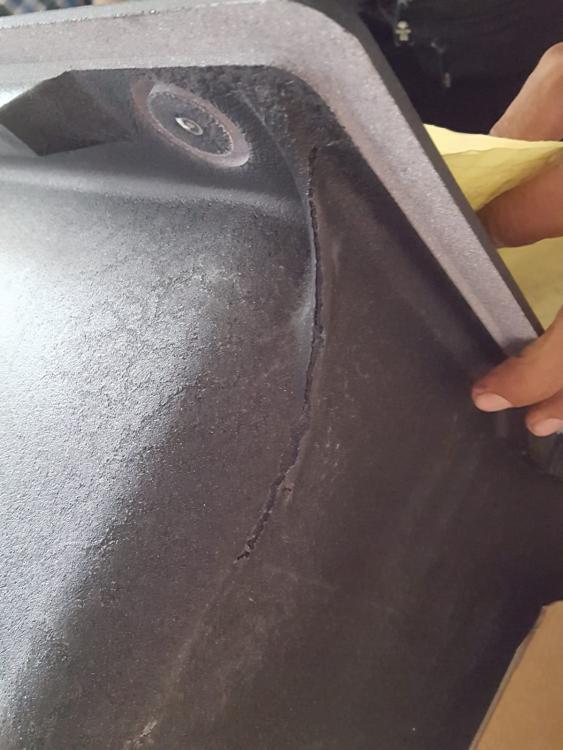
  1. hi. what happen to your Blanco sink eventually? i just received my sink last saturday. There is this crack line at the underside of the sink, and both the delivery men and the Hoe Kee sales persons told me that this is very normal. Do you have it?
  2. My contractor told me that it is common to engage electrician without license for electrical works (but all work will still follow HDB regulations). If we need endorsement from Licensed Electrical Worker (LEW), there will be an additional charge. How true is this according to your experience?
  3. My colleague recommended to me a reno contractor called Living Showcase. I would like to hear a second opinion. Has anyone worked with them before? I cannot find review online about them. Thanks in advance.
Account

Navigation

Search

Search

Configure browser push notifications

Chrome (Android)
  1. Tap the lock icon next to the address bar.
  2. Tap Permissions → Notifications.
  3. Adjust your preference.
Chrome (Desktop)
  1. Click the padlock icon in the address bar.
  2. Select Site settings.
  3. Find Notifications and adjust your preference.