


Skip to content
View in the app

A better way to browse. Learn more.

RenoTalk.com ™

A full-screen app on your home screen with push notifications, badges and more.

To install this app on iOS and iPadOS
  1. Tap the Share icon in Safari
  2. Scroll the menu and tap Add to Home Screen.
  3. Tap Add in the top-right corner.
To install this app on Android
  1. Tap the 3-dot menu (⋮) in the top-right corner of the browser.
  2. Tap Add to Home screen or Install app.
  3. Confirm by tapping Install.

XBLpteltd

Members
  • Joined

  • Last visited

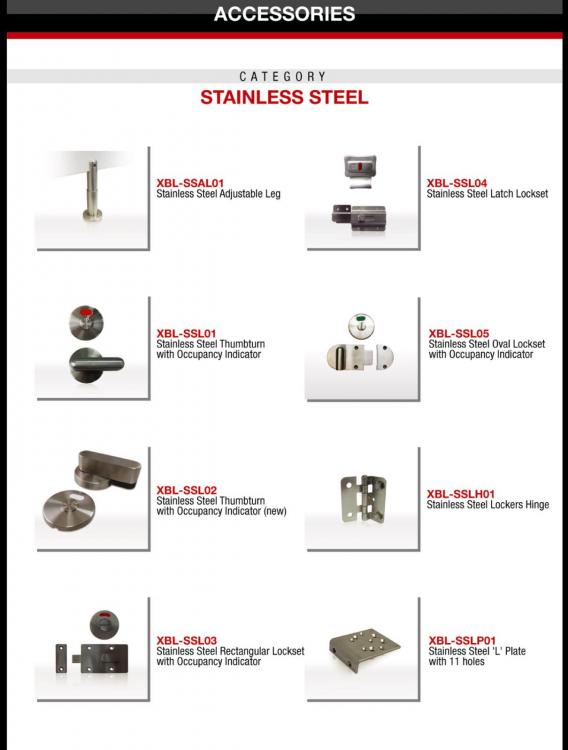
  1. Hello! We are currently supplier for commercial toilet accessories to malls and schools in Singapore. Do view some of our products in the following attachments. For more information, Contact Number: 92397107 Email: sales@xblpteltd.com
  2. XBLpteltd changed their profile photo
  3. Hello! We are direct supplier for handicapped toilet accessories. Directly from our factory and no third party involved We are currently selling products like grab bar and wall mounted shower seats. Visit us at : https://sg.carousell.com/xblpteltd/ For more information; Contact number: 92397107 Email: sales@xblpteltd.com

Account

Navigation

Search

Search

Configure browser push notifications

Chrome (Android)
  1. Tap the lock icon next to the address bar.
  2. Tap Permissions → Notifications.
  3. Adjust your preference.
Chrome (Desktop)
  1. Click the padlock icon in the address bar.
  2. Select Site settings.
  3. Find Notifications and adjust your preference.