



Bhuv
Members
-
Joined
-
Last visited
-
thanks Snoozee. This is very helpful
-
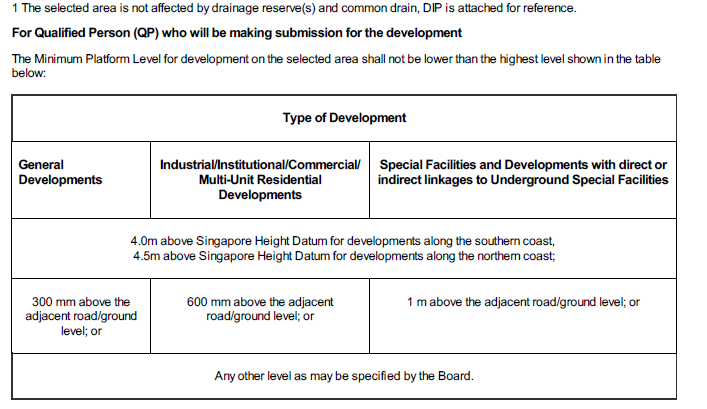
Guys this is what the drainage interpretation plan says. Does that mean that if I have a basement then I need 1m minimum height of the first floor? And If I do not have a basement then it can be only 300mm? Or can I completely escape these height requirements by saying

-
Petetherock, I will contact you once I finalise my purchase. Thanks a lot for your offer
-
It is a two storey + attic area. However, I saw only a couple of houses built 1 m above the road level while nearly all others are built at road level
-
Thanks for the quick response. is there any way I can avoid building at 1m height? My wife does not want any steps leading to the house. Should I try to keep some parts of the old house and call it a reconstruction instead of new built to maintain floor level?
-
I am planning to buy land ~4000 Sq ft in east (10m x 35m). It has a 35 year old Semi-d on it (~2000sq ft) First, what is the max size of the Semi-d I can build on property? I met an architect who told me that in this area the first floor of a new build needs to be 1 m above the ground level. Is there any way I can avoid this? finally, what is the good Budget for the Semi-d ? I would prefer to have a pool for sure. Would like to have a basement but this would depend on the costs. Should I try to reconstruct on the current building or do a completely new built? Appreciate any help