Ptrgn
Members
-
Joined
-
Last visited
Everything posted by Ptrgn
-
Thank you for yr kind advice. I'll take that in mind and do some further reading.
-
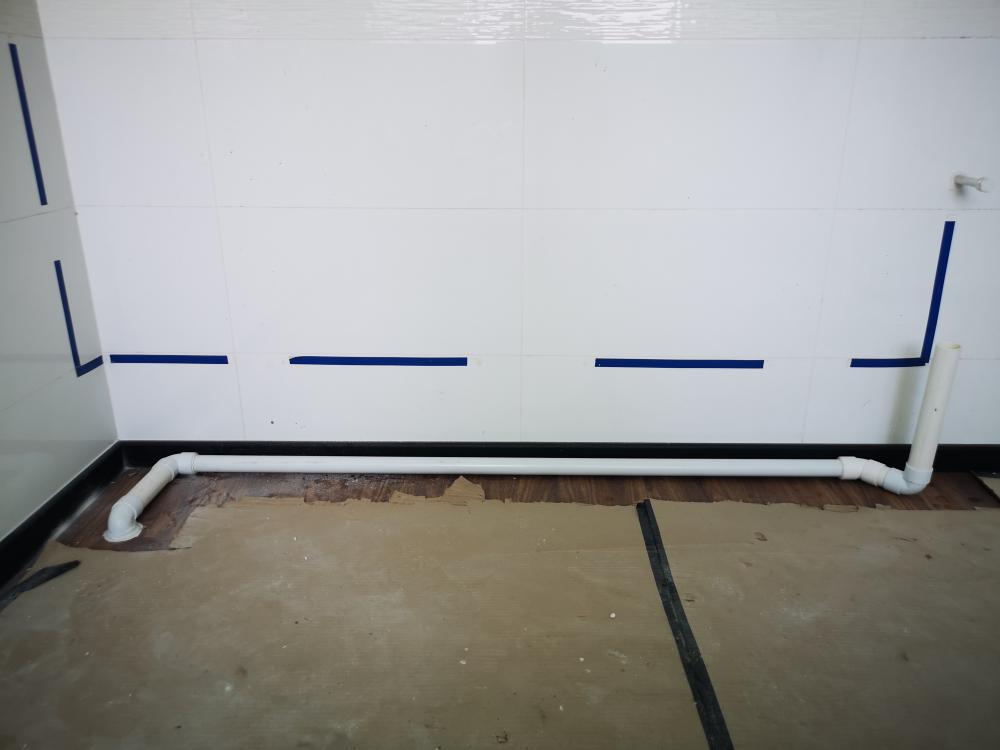
It's a drainage pipe for my kitchen sink. I'm asking if there's alternate ways or method as this seem to clog quite frequently in the long run? I measure using a gyroscope and although the right side is 8° to 10° higher than the left. It doesn't seem sufficient for the kitchen sink. However my contractor assured me that its normal. I'm asking for any well-meaning input. Thank you.
-
Hi, like to seek some advice. This is the drainage pipe my contractor did for me. He said that it cannot extend one end higher over the other and need to follow Hdb tile level. So I'm stuck with this. But my question is: Is what he said true? And if yes won't this clog over the long run? I won't name the contractor for the time being as it's not a shame and blame circus I'm interested in. I just like to seek advice from the folks here and try to solve my problem. Thanks