



Skip to content
View in the app

A better way to browse. Learn more.

RenoTalk.com ™

A full-screen app on your home screen with push notifications, badges and more.

To install this app on iOS and iPadOS
  1. Tap the Share icon in Safari
  2. Scroll the menu and tap Add to Home Screen.
  3. Tap Add in the top-right corner.
To install this app on Android
  1. Tap the 3-dot menu (⋮) in the top-right corner of the browser.
  2. Tap Add to Home screen or Install app.
  3. Confirm by tapping Install.

B Gupta

Members
  • Joined

  • Last visited

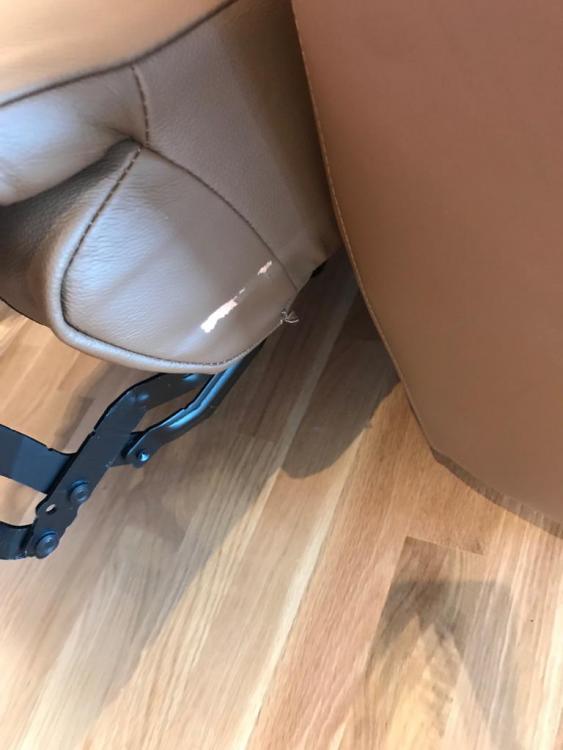
  1. I bought a recliner home theater sofa from Cosimo Gallery. Mr.Man was very helpful and helped us decide the design,. When it was delivered in July 2019 there was a big defect on the side. We immediately wrote to the store and even visited them. We were promised that this will be rectified. Nothing was done and a reminder sent on 29th Sep 2019. No response whatsoever even till today. I do not think this company even knows what customer service is. Cosimo Gallery has terrible after sales and not good quality control. I would rather buy my next sofa from a company that offers better customer service and does not ignore customers after the payment has been received.
Account

Navigation

Search

Search

Configure browser push notifications

Chrome (Android)
  1. Tap the lock icon next to the address bar.
  2. Tap Permissions → Notifications.
  3. Adjust your preference.
Chrome (Desktop)
  1. Click the padlock icon in the address bar.
  2. Select Site settings.
  3. Find Notifications and adjust your preference.