



marbletable123
Members
-
Joined
-
Last visited
Everything posted by marbletable123
-
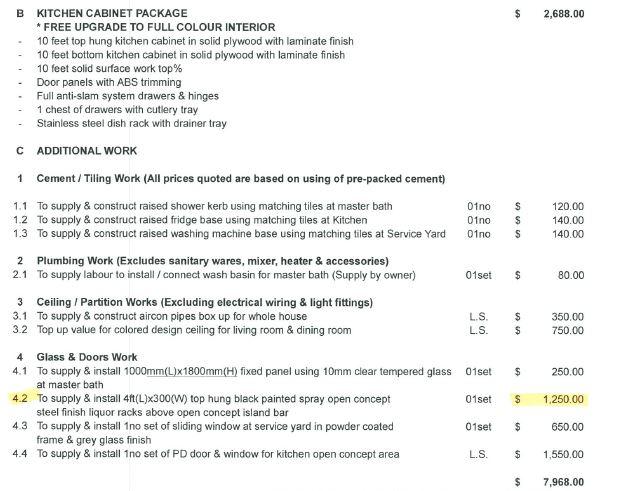
Hi all, Would like to ask around here if the below quoted to me is expensive a not. thanks for all your help!



-
hi can share his contact? thx
-
-
-
Have a good condition 5 feet marble table which includes the lazy susan and 8 chairs for sale at $600. Buyer have to find his own transport for the table. delievery not provided. Please contact me at 987 6 022 6 to deal or to view the table/or for more pictures. please view the link below for pictures. http://singapore.gumtree.sg/c-ViewAd?AdId=523851705&Guid=141222fc-8620-a20b-2702-69d5ffffa45d&MessageId=MSG.VIEW_AD.EDIT_AD_SUCCESSFULMXmessageUrlMZhttp%3A%2F%2Fsingapore.gumtree.sg%2Fc-AdDetails%3FAdId%3D523851705%26Guid%3D141222fc-8620-a20b-2702-69d5ffffa45d selling at $250 now! negotiable if fast deal!