



Skip to content
View in the app

A better way to browse. Learn more.

RenoTalk.com ™

A full-screen app on your home screen with push notifications, badges and more.

To install this app on iOS and iPadOS
  1. Tap the Share icon in Safari
  2. Scroll the menu and tap Add to Home Screen.
  3. Tap Add in the top-right corner.
To install this app on Android
  1. Tap the 3-dot menu (⋮) in the top-right corner of the browser.
  2. Tap Add to Home screen or Install app.
  3. Confirm by tapping Install.

liyanaramli

Members
  • Joined

  • Last visited

  1. Has anyone ever purchased blinds from Taobao? Any recommendations and how do I go about to buy them? Thanks! =)
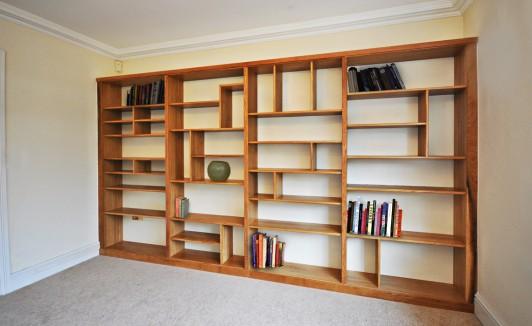
  2. Can anyone recommend me a carpenter for a book shelf / full wall shelf like the attached pic? Thanks!
  3. Hi, Please quote Panasonic, LG & Daikin System 3 - 9k BTU. 5 RM BTO. Thanks.
  4. Hi, Please quote Mitsubishi & Daikin System 3 - 9k btu. 5 RM BTO. Thanks!
  5. I applied directly from HDB TPY when we collected our keys. Really hoping our appeal is successful.
  6. Hi hazelcmm83. How long did you have to wait before the appeal goes thru? I just submitted my appeal last week when I collected my keys.

Account

Navigation

Search

Search

Configure browser push notifications

Chrome (Android)
  1. Tap the lock icon next to the address bar.
  2. Tap Permissions → Notifications.
  3. Adjust your preference.
Chrome (Desktop)
  1. Click the padlock icon in the address bar.
  2. Select Site settings.
  3. Find Notifications and adjust your preference.