



Skip to content
View in the app

A better way to browse. Learn more.

RenoTalk.com ™

A full-screen app on your home screen with push notifications, badges and more.

To install this app on iOS and iPadOS
  1. Tap the Share icon in Safari
  2. Scroll the menu and tap Add to Home Screen.
  3. Tap Add in the top-right corner.
To install this app on Android
  1. Tap the 3-dot menu (⋮) in the top-right corner of the browser.
  2. Tap Add to Home screen or Install app.
  3. Confirm by tapping Install.

Uchi

Members
  • Joined

  • Last visited

  1. Thanks for that Very helpful indeed. I haven't dared look at the bottom of my old toilet bowl... I guess there'll be one there that I can re-use?
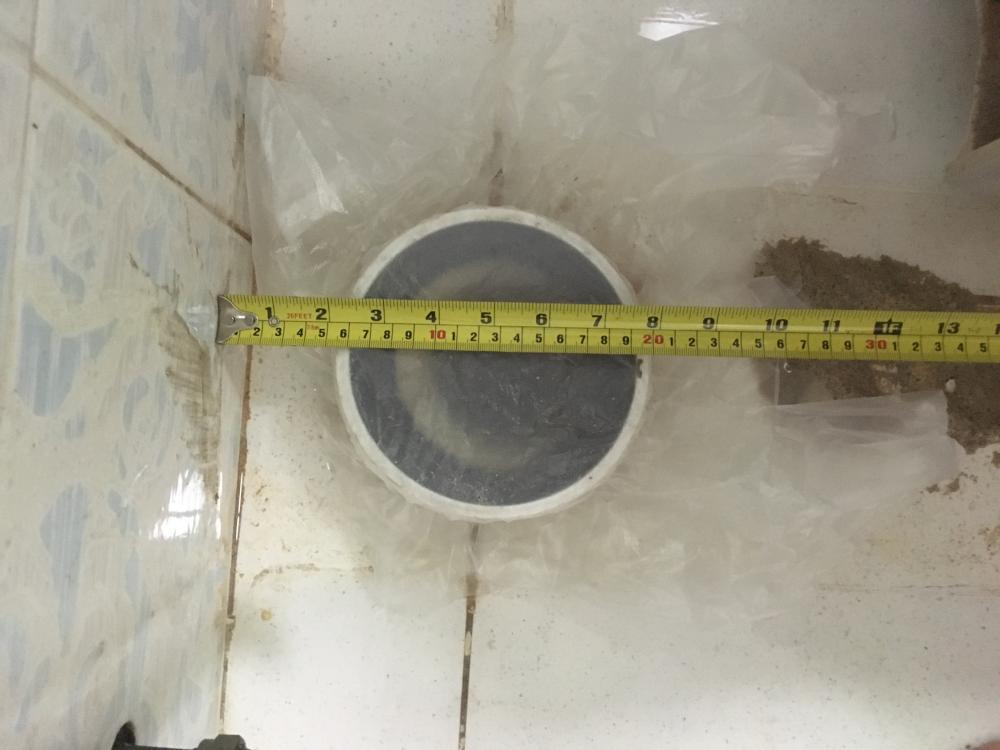
  2. Hi everyone, I just removed my W.C. because it was leaking, and now I'm looking for a new one. I need an S-trap type. However, most of the ones out there seem to specify 150mm distance from the back wall for the waste exit. I've measured my hole (not mine specifically, but the one for the W.C.) and the centre of it seems to be 130mm from the back wall. I've attached a pic. Does anyone know if my hole is weird? Would a 150mm toilet fit?
Account

Navigation

Search

Search

Configure browser push notifications

Chrome (Android)
  1. Tap the lock icon next to the address bar.
  2. Tap Permissions → Notifications.
  3. Adjust your preference.
Chrome (Desktop)
  1. Click the padlock icon in the address bar.
  2. Select Site settings.
  3. Find Notifications and adjust your preference.