Skip to content
View in the app

A better way to browse. Learn more.

RenoTalk.com ™

A full-screen app on your home screen with push notifications, badges and more.

To install this app on iOS and iPadOS
  1. Tap the Share icon in Safari
  2. Scroll the menu and tap Add to Home Screen.
  3. Tap Add in the top-right corner.
To install this app on Android
  1. Tap the 3-dot menu (⋮) in the top-right corner of the browser.
  2. Tap Add to Home screen or Install app.
  3. Confirm by tapping Install.

stevenong2017

Members
  • Joined

  • Last visited

Everything posted by stevenong2017

  1. can't really blame them also. many of my friends simply take the drawing from one contractor who done it before receiving payment, and went around asking for cheaper and cheaper quotes through many rounds of comparisons. the original contractor who provided the drawing FOC was not paid at all.
  2. include tiles? how about kitchen?
  3. haha but you took only 1 quote ah? but you also no hurry, cos you gonna do it together with your HIP right?
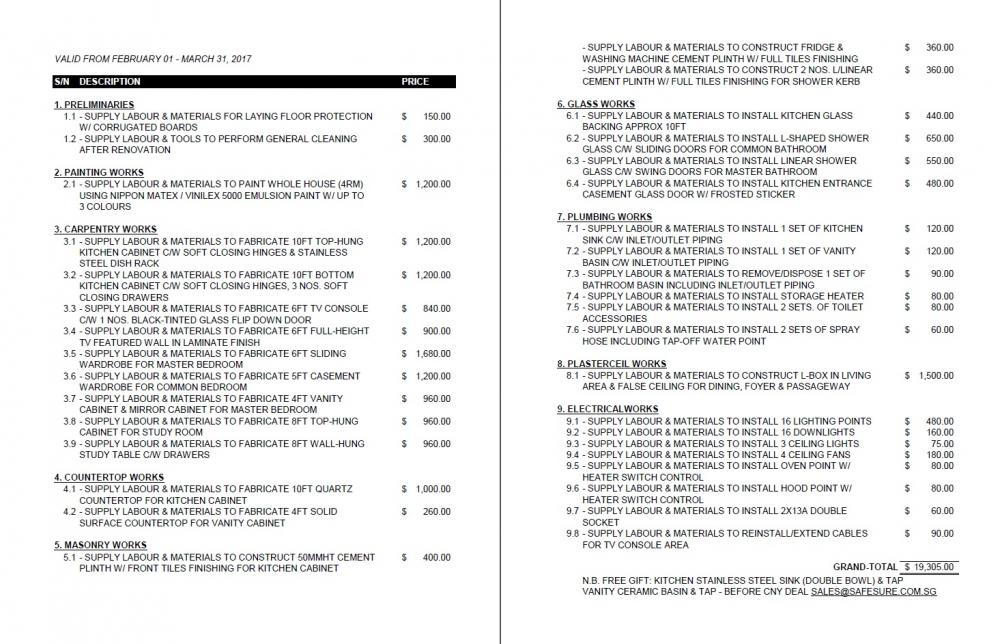
  4. many items look like they are higher than i was quoted by my contractor..
  5. Hi, I'm getting keys to my 4RM BTO soon and collecting some quotations for my renovation. Among 2-3 IDs that i have met, i chanced upon this contractor through referrals in my office. Can anyone who done adequate research give an opinion if it's a good offer?

Account

Navigation

Search

Search

Configure browser push notifications

Chrome (Android)
  1. Tap the lock icon next to the address bar.
  2. Tap Permissions → Notifications.
  3. Adjust your preference.
Chrome (Desktop)
  1. Click the padlock icon in the address bar.
  2. Select Site settings.
  3. Find Notifications and adjust your preference.