



WindWaterWinter
Members
-
Joined
-
Last visited
Everything posted by WindWaterWinter
-
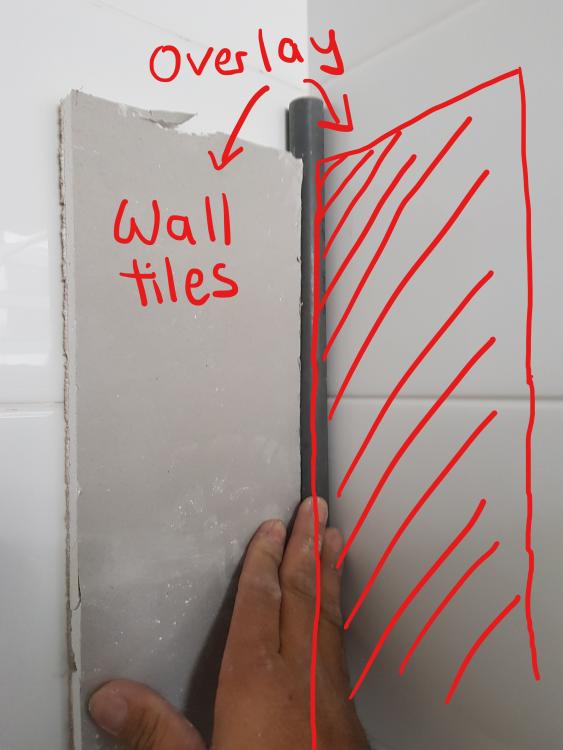
Hi! I bought my air con from MDS and the air con guy that came fixed the pipe in the main BR toilet in this manner. We are overlaying the toilet with wall tiles, so he said there are 2 choices. Choice (1): As attached in the image, the overlay of the wall tiles will meet the air con pipe, and not go under it. In this way, if the air con pipe is gone, I can see the original HDB wall tile. Choice (2): Install a white casing over the air con pipe, and the have the overlay wall tiles underneath the white casing. My main contractor, who is doing the overlay of the toilet, said it might look ugly. And I believe he hasn't done it before. We are also not sure whether he would do a good job since he hasn't done it before. Anyone went for this approach of using the overlay of wall tiles to slightly over up the sight of the air con pipe?
-
I got a quotation as below. Am I getting chopped? 1. Lighting point $40ea 2. 13A double power point $75ea 3. SCV point $120ea 4. Data Point $180ea 5. hood point $140ea 6. Oven point $155ea 7. 20 Amp Industrial hob point $250ea 8. Install hanging light $65ea 9. Install light $10ea 10. Install T5 $10ea 11. Conceal and hacking works $400