Skip to content
View in the app

A better way to browse. Learn more.

RenoTalk.com ™

A full-screen app on your home screen with push notifications, badges and more.

To install this app on iOS and iPadOS
  1. Tap the Share icon in Safari
  2. Scroll the menu and tap Add to Home Screen.
  3. Tap Add in the top-right corner.
To install this app on Android
  1. Tap the 3-dot menu (⋮) in the top-right corner of the browser.
  2. Tap Add to Home screen or Install app.
  3. Confirm by tapping Install.

Main Door + Gate + Card Digital Lock Package

Featured Replies

??Latest Promotion for Epic Digital Lock , unlock your main door and gate with only 1card. Bundle with New Door and Gate from $1688.??

Get the latest laminate design for your hdb fire rated main door, up to 500 design you can choose now.

=Laminate=

-?water resistant

-?scratch resistant

-?sound resistant


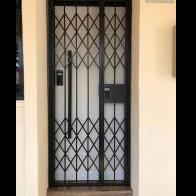
Mild Steel Gate with powder coating can install for HDB/BTO/Resale/Condo. Up to 18 colour to choose.


Epic 2way + Epic Gate lock comes with 4 card + 1 remote control ??

Unlock BOTH digital lock by using 1 card or 1 remote control??

MASTER PASSWORD

To prevent others can change your ssetting

RFID CARD ACCESS

Can Using 1 Card / Sticker to unlock both digital lock

REMOTE CONTROL ACCESS

Can using 1 remote control to unlock both digital lock

ONE TIME PASSWORD

For house keeper, or guest whom suddenly appear at your house

SCRAMBLE CODE

Add security to password by adding extra numbers

EASY PROGRAMMING

Other BRAND do charge if you forget about the master password


FOC 2 Remote Control + King Door Closer + 8 RFID card


Order Now and get it today 96177025 Leon (24/7) speak English and Mandarin

?:www.digitallock.com.sg

?:11 woodlands close #08-38, woodlans 11

?: 96177025 Leon (24/7)


#MYDIGITALLOCK #gateman #samsung #SAMSUNGDIGITALLOCK #GATEMANDIGITALLock #bedroomdoor #firerateddoor #digitallock #door #btodoor #veneerdoor #hdbdoor #laminatedoor #gatedigitallock #newdoor #cheapestdoor #hdbgate #toiletdoor #bedroomdoo

54515811_2632976676743430_5090812538241679360_n.jpg

0febcb27-80f0-4a12-9000-.jpg

1137bd04-2a21-48f3-bc33-1bd6490de8be.jpg

3305b48d-147a-45f3-a7d1-00.jpg

20800349_1649808495060258_2352335174957161108_n.jpg

37918370_2145443742163395_1114447462447185920_n.jpg

42123576_2248007771906991_5354878002456952832_n.jpg

42203310_2253743821333386_79437103766700032_n.jpg

Create an account or sign in to comment

Account

Navigation

Search

Search

Configure browser push notifications

Chrome (Android)
  1. Tap the lock icon next to the address bar.
  2. Tap Permissions → Notifications.
  3. Adjust your preference.
Chrome (Desktop)
  1. Click the padlock icon in the address bar.
  2. Select Site settings.
  3. Find Notifications and adjust your preference.