Skip to content
View in the app

A better way to browse. Learn more.

RenoTalk.com ™

A full-screen app on your home screen with push notifications, badges and more.

To install this app on iOS and iPadOS
  1. Tap the Share icon in Safari
  2. Scroll the menu and tap Add to Home Screen.
  3. Tap Add in the top-right corner.
To install this app on Android
  1. Tap the 3-dot menu (⋮) in the top-right corner of the browser.
  2. Tap Add to Home screen or Install app.
  3. Confirm by tapping Install.

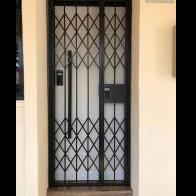
WTS: Champagne Gold Smartphone Digital lock HP: 96177025

Featured Replies

Final Chinese New Year Promotion ??

Epic 5G Satin Gold push pull lock at $799
With
1. Wang lei Abalone worth $48
2. Deposit Safe box worth $99
3. Less $200 for My President Mattress
4. Red Packet
5. Letter box digital lock worth $99

With 1 year warranty ????

Unlock the Epic push pull lock with smartphone today ???

Add $499 for Epic 5G Satin gold gate lock with 1 year warranty

Order Now and get it today 96177025 Leon (24/7) speak English and Mandarin

Call our Mobile Showroom and we will drive to show you today ???

https://firerateddoor.com.sg/

Free Taxi Rebate (Twice the amount) with Any Purchase ??

**** Macpherson Showroom (Central)****
Above Macpherson Mrt station

10 Arumugam Road #08-01
LTC Building A, Singapore 409957
HP 96177025

#HDBDoor #Firerateddoor #laminatedoor #bedroomdoor #maindoor #condodoor #btodoor #veneerdoor #doorfactory #cheapestdoor #hdbgate #mildsteelgate #wroughtirongate #firerateddoor #digitallock #samsungdigitallock #epicdigitallock #keywedigitallock #gatemandigitallock #cheapestdigitallock #digitaldoorlock #toiletdoor #koreadigitallock #homeautomation #latestdigitallock #MYDIGITALLOCK

Digital-LockPromotion-epic.jpg

-.jpg

000.jpg

00zzx0.jpg

0a8badd1-27f9-4632-b43b-840fb34423ff.jpg

0c2c7c0b-adf0-45b4-9c3b-c8bf9cc758a-.jpg

99.jpg

37386807_1965821400108058_6910272010379591680_n.jpg

67814165_2998701650170929_841707345409998848_n.jpg

69601249_3063686637005763_1373306447047163904_n.jpg

72633404_3296343187073439_3751728665486950400_o.jpg

Create an account or sign in to comment

Account

Navigation

Search

Search

Configure browser push notifications

Chrome (Android)
  1. Tap the lock icon next to the address bar.
  2. Tap Permissions → Notifications.
  3. Adjust your preference.
Chrome (Desktop)
  1. Click the padlock icon in the address bar.
  2. Select Site settings.
  3. Find Notifications and adjust your preference.