Skip to content
View in the app

A better way to browse. Learn more.

RenoTalk.com ™

A full-screen app on your home screen with push notifications, badges and more.

To install this app on iOS and iPadOS
  1. Tap the Share icon in Safari
  2. Scroll the menu and tap Add to Home Screen.
  3. Tap Add in the top-right corner.
To install this app on Android
  1. Tap the 3-dot menu (⋮) in the top-right corner of the browser.
  2. Tap Add to Home screen or Install app.
  3. Confirm by tapping Install.

WTS: Mazi Push Pull Digital Lock at $400

Featured Replies

Order Now and we will Deliver to you within 48 hours?(FREE)

All comes with 6 months warranty?

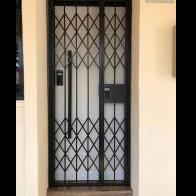
1. Mazi Fingerprint Push Pull Digital Lock ($400)

?Pin

?Fingerprint

?RFID Card

?Bluetooth

?WiFi ($50 wifi bridge)


2. Epic Gold Card Gate Digital Lock ($300)

?Pin

?RFID Card

?Emergency Keys

?Remote Control


3. Smartphone Door Viewer ($260)

?Motion Dection

?Mobile Apps Control

?2 ways communication

?Recorder

(Available in Silver or Champange Gold)

Call I Whatsapp I SMS 9617 7025 Leon for more information or details.

www.mydigitallock.com.sg

#HDBDoor #Firerateddoor #maindoor #condodoor #btodoor #doorfactory #cheapestdoor #hdbgate #mildsteelgate #wroughtirongate #firerateddoor #digitallock #samsungdigitallock #epicdigitallock #keywedigitallock #gatemandigitallock #cheapestdigitallock #digitaldoorlock #toiletdoor #koreadigitallock #homeautomation #latestdigitallock #MYDIGITALLOCK #hariraya #locksmith #digitallockspoil #24hoursdigitallock #circuitbreaker #cbdigitallock

35372488_1910393472317518_796164951017259008_n.jpg

38086001_1985380961485435_5444065047057793024_n.jpg

38740214_1997636260259905_8327008217536135168_n.jpg

46488467_2374797502561350_6654985360533094400_n.jpg

Create an account or sign in to comment

Account

Navigation

Search

Search

Configure browser push notifications

Chrome (Android)
  1. Tap the lock icon next to the address bar.
  2. Tap Permissions → Notifications.
  3. Adjust your preference.
Chrome (Desktop)
  1. Click the padlock icon in the address bar.
  2. Select Site settings.
  3. Find Notifications and adjust your preference.