



Skip to content
View in the app

A better way to browse. Learn more.

RenoTalk.com ™

A full-screen app on your home screen with push notifications, badges and more.

To install this app on iOS and iPadOS
  1. Tap the Share icon in Safari
  2. Scroll the menu and tap Add to Home Screen.
  3. Tap Add in the top-right corner.
To install this app on Android
  1. Tap the 3-dot menu (⋮) in the top-right corner of the browser.
  2. Tap Add to Home screen or Install app.
  3. Confirm by tapping Install.

jeng001

Members
  • Joined

  • Last visited

Everything posted by jeng001

  1. Good afternoon. The end result of your renovation work is very lovely. If you do not mind, I'd like your contractor's details to pass on to my aunt who's planning to start her renovation works within the next couple of months. My email is joelngjiaen@gmail.com. Have a good day!
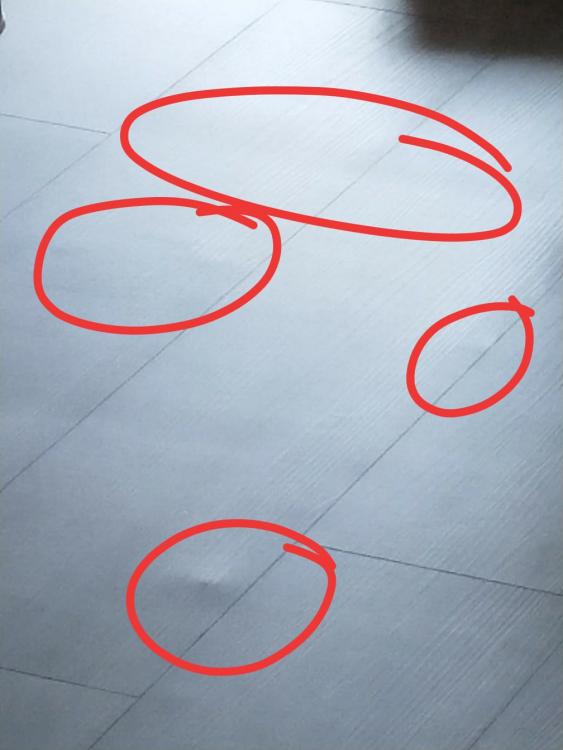
  2. Hi, I'm new to the renovation scenario. I've recently completed my renovations, and found out that the flooring has even lines spreading across the floor. You can walk across it and it feels levelled just fine, but visually it looks like there are dips on the surface. When I asked my contractor about it, he tells me that it's because of the tiles below which causes this overlay issue. I've attached an image. Anybody ever experienced this issue before? Any advice you could share?
Account

Navigation

Search

Search

Configure browser push notifications

Chrome (Android)
  1. Tap the lock icon next to the address bar.
  2. Tap Permissions → Notifications.
  3. Adjust your preference.
Chrome (Desktop)
  1. Click the padlock icon in the address bar.
  2. Select Site settings.
  3. Find Notifications and adjust your preference.