Skip to content
View in the app

A better way to browse. Learn more.

RenoTalk.com ™

A full-screen app on your home screen with push notifications, badges and more.

To install this app on iOS and iPadOS
  1. Tap the Share icon in Safari
  2. Scroll the menu and tap Add to Home Screen.
  3. Tap Add in the top-right corner.
To install this app on Android
  1. Tap the 3-dot menu (⋮) in the top-right corner of the browser.
  2. Tap Add to Home screen or Install app.
  3. Confirm by tapping Install.

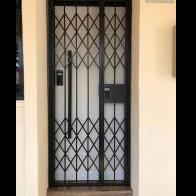
Epic Smartphone 5G Digital Lock only at $450 , Free installation!! Unlock by Smartphone (4G/Wifi)

Featured Replies

First New launch for Epic Digital lock in 2019 ????

Epic 5G digital lock at $450 with FREE installation!!

Comes with 1+2 year warranty 


Five Greatest Features

1.Password (4-12 digits)

2.Fingerprint (up to 100)

3.RFID Cards (up to 30)

4.Mobile apps access (bluetooth/4G/Wifi)


Able to delete individual fingerprint and card


Further Discount if you just need 1 year warranty


1. Epic 5G on maindoor and maingate (bundle deal)

$799 only!!


Add $50 for Wifi-brdige (worth $99)


Now you can unlock using 4G smartphone with ?????

A) push message

B)Time attendance

C) Invite guest giving temporary access

D) Smart open when you walk close to your digital lock (smart open)


Less $100 for Any My President Hotel Quality Mattress from $799 onwards with Purchase of Digital Lock

https://mypresidentmattress.com


Free Delivery worth $150, Deliver within 24 Hours, endorse by most Singapore celebrities


Order Now and get it today 96177025 Leon (24/7) speak English and Mandarin


Call our Mobile Showroom and we will drive to show you today ???


Free Taxi Rebate (Twice the amount) with Any Purchase??


?:www.digitallock.com.sg

?:11 woodlands close #08-38, woodlans 11

?: 96177025 Leon (24/7)


#HDBDoor #Firerateddoor #laminatedoor #bedroomdoor #maindoor #condodoor #btodoor #veneerdoor #doorfactory #cheapestdoor #hdbgate #mildsteelgate #wroughtirongate #firerateddoor #digitallock #samsungdigitallock #epicdigitallock #keywedigitallock #gatemandigitallock #samsungdr708digitallock #Samsungdr738digitallock #cheapestdigitallock #digitaldoorlock #toiletdoor #koreadigitallock #homeautomation #latestdigitallock #MYDIGITALLOCK #gatedigitallock #pushpulldigitallock #locksmithdigitallock #breakdigitallock #installationservicesdigitallock

0e021bca-1853-4e93-a0ba-d194f23fc02433.jpg

0e021bca-1853-4e93-a0ba-d194f23fc02400.jpg

1a2516e4-fad7-483e-bacd-11.jpg

0c2c7c0b-adf0-45b4-9c3b-c8bf69cc758a.jpg

1a2516e4-fad7-483e-bacd-c4c6c4aef3.jpg

1a2516e4-fad7-483e-bacd-c4c6c34aef3e.jpg

53203699_2600845403289891_1101727646217142272_n.jpg

53353381_2590813110959787_7799843128466210816_n.jpg

55875282_2650243131683451_7502220754054807552_n.jpg

56344587_2674326395941791_2934456054743826432_n.jpg

57503880_2712624278778669_4413753039001747456_n.jpg

57686553_2712623485445415_5977519162249969664_n.jpg

58769460_2721764224531341_5716888469280653312_n.jpg

Create an account or sign in to comment

Account

Navigation

Search

Search

Configure browser push notifications

Chrome (Android)
  1. Tap the lock icon next to the address bar.
  2. Tap Permissions → Notifications.
  3. Adjust your preference.
Chrome (Desktop)
  1. Click the padlock icon in the address bar.
  2. Select Site settings.
  3. Find Notifications and adjust your preference.