Skip to content
View in the app

A better way to browse. Learn more.

RenoTalk.com ™

A full-screen app on your home screen with push notifications, badges and more.

To install this app on iOS and iPadOS
  1. Tap the Share icon in Safari
  2. Scroll the menu and tap Add to Home Screen.
  3. Tap Add in the top-right corner.
To install this app on Android
  1. Tap the 3-dot menu (⋮) in the top-right corner of the browser.
  2. Tap Add to Home screen or Install app.
  3. Confirm by tapping Install.

Epic Smartphone 5G Digital Lock only at $450 , Free installation!! Unlock by Smartphone (4G/Wifi)

Featured Replies

First New launch for Epic Digital lock in 2019 ????

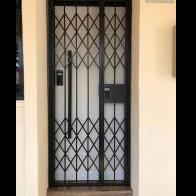
Epic 5G digital lock at $450 with FREE installation!!

Comes with 1+2 year warranty 


Five Greatest Features

1.Password (4-12 digits)

2.Fingerprint (up to 100)

3.RFID Cards (up to 30)

4.Mobile apps access (bluetooth/4G/Wifi)


Able to delete individual fingerprint and card


Further Discount if you just need 1 year warranty


1. Epic 5G on maindoor and maingate (bundle deal)

$799 only!!


Add $50 for Wifi-brdige (worth $99)


Now you can unlock using 4G smartphone with ?????

A) push message

B)Time attendance

C) Invite guest giving temporary access

D) Smart open when you walk close to your digital lock (smart open)


Less $100 for Any My President Hotel Quality Mattress from $799 onwards with Purchase of Digital Lock

https://mypresidentmattress.com


Free Delivery worth $150, Deliver within 24 Hours, endorse by most Singapore celebrities


Order Now and get it today 96177025 Leon (24/7) speak English and Mandarin


Call our Mobile Showroom and we will drive to show you today ???


Free Taxi Rebate (Twice the amount) with Any Purchase??


?:www.digitallock.com.sg

?:11 woodlands close #08-38, woodlans 11

?: 96177025 Leon (24/7)


#HDBDoor #Firerateddoor #laminatedoor #bedroomdoor #maindoor #condodoor #btodoor #veneerdoor #doorfactory #cheapestdoor #hdbgate #mildsteelgate #wroughtirongate #firerateddoor #digitallock #samsungdigitallock #epicdigitallock #keywedigitallock #gatemandigitallock #samsungdr708digitallock #Samsungdr738digitallock #cheapestdigitallock #digitaldoorlock #toiletdoor #koreadigitallock #homeautomation #latestdigitallock #MYDIGITALLOCK #gatedigitallock #pushpulldigitallock #locksmithdigitallock #breakdigitallock #installationservicesdigitallock

1a2516e4-fad7-483e-bacd-c4c6c4aef3.jpg

1b6940e2-cb4b-47f4-97a6-.jpg

1b6940e2-cb4b-47f4-97a6-2fda023d603c.jpg

52363102_2572928892748209_3967266496815562752_n.jpg

54279115_2642223932485371_7815281465721094144_n.jpg

56664726_2672246482816449_8914168016841736192_n.jpg

57431203_2708863215821442_7422968368241573888_n.jpg

58376625_2699410883433342_70079190367469568_n.jpg

58663942_2721769124530851_7169971425590116352_n.jpg

0e021bca-1853-4e93-a0ba-d194f23fc024-.jpg

59773505_2753443708030059_6171998506933288960_n.jpg

60014682_2755984687775961_8973245094429720576_n.jpg

Create an account or sign in to comment

Account

Navigation

Search

Search

Configure browser push notifications

Chrome (Android)
  1. Tap the lock icon next to the address bar.
  2. Tap Permissions → Notifications.
  3. Adjust your preference.
Chrome (Desktop)
  1. Click the padlock icon in the address bar.
  2. Select Site settings.
  3. Find Notifications and adjust your preference.