Skip to content
View in the app

A better way to browse. Learn more.

RenoTalk.com ™

A full-screen app on your home screen with push notifications, badges and more.

To install this app on iOS and iPadOS
  1. Tap the Share icon in Safari
  2. Scroll the menu and tap Add to Home Screen.
  3. Tap Add in the top-right corner.
To install this app on Android
  1. Tap the 3-dot menu (⋮) in the top-right corner of the browser.
  2. Tap Add to Home screen or Install app.
  3. Confirm by tapping Install.

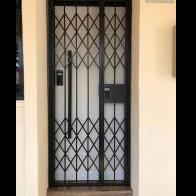
Keywe Smartphone Push Pull with Epic 5G Gate Lock $1299 ,Unlock HDB door and HDB gate by using (WiFi/4G) Get it today , Call 96177025 Leon

Featured Replies

The latest smartphone keywe Digital lock in 2019 ????

Mobile app Features

A) Time attendance

B) Invite guest give guest code

C) Smart open when you walk near the digital lock .


With 1+2 years warranty


Unlock both door and gate using mobile phone or fingerprint ???


Free Wi-Fi bridge worth $99 and Bluetooth


Now you can unlock using 4G smartphone with ?????


Less $100 for Any My President Hotel Quality Mattress from $799 onwards with Purchase of Digital Lock

https://mypresidentmattress.com/


Free Delivery worth $150, Deliver within 24 Hours, endorse by most Singapore celebrities


Order Now and get it today 96177025 Leon (24/7) speak English and Mandarin


Call our Mobile Showroom and we will drive to show you today ???

www.digitallock.com.sg


Free Taxi Rebate (Twice the amount) with Any Purchase ??


?:www.digitallock.com.sg

?:2 yishun industrial st 1 #05-10 , s768159

?: 96177025 Leon (24/7)

#HDBDoor #Firerateddoor #laminatedoor #bedroomdoor #maindoor #condodoor #btodoor #veneerdoor #doorfactory #cheapestdoor #hdbgate #mildsteelgate #wroughtirongate #firerateddoor #digitallock #samsungdigitallock #epicdigitallock #keywedigitallock #gatemandigitallock #samsungdr708digitallock #Samsungdr738digitallock #cheapestdigitallock #digitaldoorlock #toiletdoor #koreadigitallock #homeautomation #latestdigitallock #MYDIGITALLOCK #gatedigitallock #pushpulldigitallock #locksmithdigitallock #breakdigitallock #installationservicesdigitallock

72bec2ff-9acd-4ce2-8cf9-bcfea3486c49.jpg

55506893_2646411548733276_1602494088169390080_n.jpg

55549784_2646411172066647_4700119455181570048_n.jpg

55590279_2650222018352229_6541821849980895232_n.jpg

58384572_2712622862112144_2596454201701695488_n.jpg

61613759_2811821168858979_106603953029906432_n.jpg

Create an account or sign in to comment

Account

Navigation

Search

Search

Configure browser push notifications

Chrome (Android)
  1. Tap the lock icon next to the address bar.
  2. Tap Permissions → Notifications.
  3. Adjust your preference.
Chrome (Desktop)
  1. Click the padlock icon in the address bar.
  2. Select Site settings.
  3. Find Notifications and adjust your preference.