Skip to content
View in the app

A better way to browse. Learn more.

RenoTalk.com ™

A full-screen app on your home screen with push notifications, badges and more.

To install this app on iOS and iPadOS
  1. Tap the Share icon in Safari
  2. Scroll the menu and tap Add to Home Screen.
  3. Tap Add in the top-right corner.
To install this app on Android
  1. Tap the 3-dot menu (⋮) in the top-right corner of the browser.
  2. Tap Add to Home screen or Install app.
  3. Confirm by tapping Install.

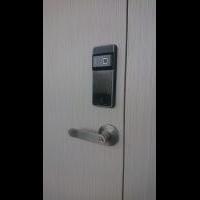
WTS: Epic 5G digital lock on wooden door at $450 Call 91616282

Featured Replies

Epic 5G digital lock at $450 , the latest smartphone digital lock

Able to unlock using Wi-Fi or bluetooth

With 1+2 years warranty

Five Greatest Features 
1. Unlock using Bluetooth (keywe app) 
2. Unlock using Wi-Fi using bridge at $50 
3. 100 fingerprint 
4. Up to 100 card, 4 given 
5.. Password

Mobile app Features 
A) Time attendance 
B,) Invite guest give guest code 
C) Smart open when you walk near the digital lock

Able to delete individual fingerprint and card

Further Discount if you just need 1 year warranty

Order Now and get it today 91616282 Elaine (24/7) speak English and Mandarin

Call our Mobile Showroom and we will drive to show you today 

www.mydigitallock2018.com.sg

Free Taxi Rebate (Twice the amount) with Any Purchase 

**** MY Digital Lock Showroom (Since 2018)****
51 Bukit Batok Cres, #05-14 Singapore 658077
Office: 91616282/81951253

#HDBDoor #Firerateddoor #laminatedoor #bedroomdoor #maindoor#condodoor #btodoor #veneerdoor #doorfactory #cheapestdoor #hdbgate#mildsteelgate #wroughtirongate #firerateddoor #digitallock#samsungdigitallock #epicdigitallock #keywedigitallock #gatemandigitallock#samsungdr708digitallock #Samsungdr738digitallock #cheapestdigitallock#digitaldoorlock #toiletdoor #koreadigitallock #homeautomation#latestdigitallock #MYDIGITALLOCK
#gatedigitallock

https://mydigitallock2018.com.sg/

62173704_2831717776869318_3499088544423477248_n.jpg

55875282_2650243131683451_7502220754054807552_n.jpg

52938326_2590811730959925_6264983651243524096_n.jpg

61740141_2819351898105906_76999649696677888_n.jpg

Create an account or sign in to comment

Account

Navigation

Search

Search

Configure browser push notifications

Chrome (Android)
  1. Tap the lock icon next to the address bar.
  2. Tap Permissions → Notifications.
  3. Adjust your preference.
Chrome (Desktop)
  1. Click the padlock icon in the address bar.
  2. Select Site settings.
  3. Find Notifications and adjust your preference.