Skip to content
View in the app

A better way to browse. Learn more.

RenoTalk.com ™

A full-screen app on your home screen with push notifications, badges and more.

To install this app on iOS and iPadOS
  1. Tap the Share icon in Safari
  2. Scroll the menu and tap Add to Home Screen.
  3. Tap Add in the top-right corner.
To install this app on Android
  1. Tap the 3-dot menu (⋮) in the top-right corner of the browser.
  2. Tap Add to Home screen or Install app.
  3. Confirm by tapping Install.

laser cut 4D lucky cat HDB gate $880, less $50 for gate digital lock in Singapore HP 88140503 Ren

Featured Replies

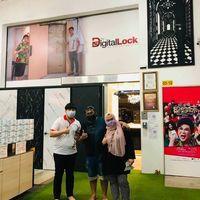
Hello to the person that click into my post. I am  from My Digital Lock Yishun, we specialize in Gateman, EPIC and Samsung digital lock, HDB Door, Gate and My President Pocket Spring Mattress ^^V

we have many promotion package with discount or free gifts with the purchase.

Functions for most digital locks

100 Fingerprints

Up to 20 cards

Pin / One time password

2 mechincal keys

When you purchase our EPIC digital door lock we will less $100 when you purchase laminate HDB main door

And less $50 for HDB gate / Less $100 for My President Hotel Quality Mattress

Order now and get it today

We can drive our mobile showroom to visit you or

Visit our showroom for more details

https://www.mydigitallock.com.sg/digital-lock/

Free Taxi Rebate (Twice the amount) with Any Purchase

**** 1st Yishun Showroom (North) ****

2 Yishun industrial street 1 #05-10

****6th Boon Lay Showroom (West)****

Jurong point shopping center level 3

Outside FairPrice Extra

****5th Macpherson Showroom (Central)****

Above Macpherson Mrt station

10 Arumugam Road #08-01

LTC Building A, Singapore 409957

*****4th Tampines Showroom (East) ******

Tampines 1 Shopping Centre #B1-18

(Beside Gain City and Home Fix)

**** 2nd Bukit Batok Showroom (West)****

51 Bukit Batok Cres, #05-14 Singapore 658077

84303754_3565975733443515_8272769356182585344_n.jpg

84337682_3554246941283061_891138733905018880_n.jpg

84352196_3565975830110172_2995828732221980672_n.jpg

84417850_3565975743443514_6517281072571482112_n.jpg

84452077_3565975753443513_3024590620669771776_n.jpg

85121841_3565975836776838_236897223382663168_n.jpg

Create an account or sign in to comment

Account

Navigation

Search

Search

Configure browser push notifications

Chrome (Android)
  1. Tap the lock icon next to the address bar.
  2. Tap Permissions → Notifications.
  3. Adjust your preference.
Chrome (Desktop)
  1. Click the padlock icon in the address bar.
  2. Select Site settings.
  3. Find Notifications and adjust your preference.