Skip to content
View in the app

A better way to browse. Learn more.

RenoTalk.com ™

A full-screen app on your home screen with push notifications, badges and more.

To install this app on iOS and iPadOS
  1. Tap the Share icon in Safari
  2. Scroll the menu and tap Add to Home Screen.
  3. Tap Add in the top-right corner.
To install this app on Android
  1. Tap the 3-dot menu (⋮) in the top-right corner of the browser.
  2. Tap Add to Home screen or Install app.
  3. Confirm by tapping Install.

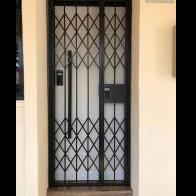
Epic Metallic Push Pull only at $899 , unlock by smartphone (4G/Wifi) with Free installation!!

Featured Replies

Epic metallic black push pull digital lock at $799

Best seller in 2017 for most bto hdb fire rated door in Singapore If you need a nice digital lock that is full black,

Epic metallic push pull is your favorite choice ??????


Comes with 1+2 years warranty


Features

1.Fingerprint (up to 100)

2.RFID cards (up to 30)

3.Password (4-12 digits)

 4.Emergency Key (2 keys)

 5.Mobile apps access (bluetooth/4G/Wifi)


Further Discount if you just need 1 year warranty

Less $100 for Any My President Hotel Quality Mattress from $799 onwards with Purchase of Digital Lock

https://mypresidentmattress.com


 Free Delivery worth $150, Deliver within 24 Hours, endorse by most Singapore celebrities


Order Now and get it today 96177025 Leon (24/7) speak English and Mandarin


Call our Mobile Showroom and we will drive to show you today ???


Free Taxi / Grab Rebate (Twice the amount) with Any Purchase ??


?:www.digitallock.com.sg

 ?:11 woodlands close #08-38, woodlans 11

?: 96177025 Leon (24/7)


#HDBDoor #Firerateddoor #laminatedoor #bedroomdoor #maindoor #condodoor #btodoor #veneerdoor #doorfactory #cheapestdoor #hdbgate #mildsteelgate #wroughtirongate #firerateddoor #digitallock #samsungdigitallock #epicdigitallock #keywedigitallock #gatemandigitallock #samsungdr708digitallock#Samsungdr738digitallock #cheapestdigitallock #digitaldoorlock #toiletdoor #koreadigitallock #homeautomation #latestdigitallock #MYDIGITALLOCK #gatedigitallock #pushpulldigitallock#locksmithdigitallock #breakdigitallock #installationservicesdigitallock

0e021bca-1853-4e93-a0ba-d194f23fc0249.jpg

0e021bca-1853-4e93-a0ba-d194f23fc02400.jpg

0f7f0ede-0232-4d2d-b018.jpg

0f7f0ede-0232-4d2d-b018-d3f199de26b4.jpg

1a2516e4-fad7-483e-bacd-.jpg

32765944_2016910368350067_1463107886719696896_n.jpg

37488548_2127258513981918_3705352154085588992_n.jpg

37702703_2136952279679208_3608734133162868736_n.jpg

56830081_2690188394355591_3058168451651600384_n.jpg

a8bd38f7-06a7-4e40-96f1-15bbf4fd0106.jpg

f573079f-a25f-4199-b8db-0a631f774ecf.jpg

Create an account or sign in to comment

Account

Navigation

Search

Search

Configure browser push notifications

Chrome (Android)
  1. Tap the lock icon next to the address bar.
  2. Tap Permissions → Notifications.
  3. Adjust your preference.
Chrome (Desktop)
  1. Click the padlock icon in the address bar.
  2. Select Site settings.
  3. Find Notifications and adjust your preference.