Skip to content
View in the app

A better way to browse. Learn more.

RenoTalk.com ™

A full-screen app on your home screen with push notifications, badges and more.

To install this app on iOS and iPadOS
  1. Tap the Share icon in Safari
  2. Scroll the menu and tap Add to Home Screen.
  3. Tap Add in the top-right corner.
To install this app on Android
  1. Tap the 3-dot menu (⋮) in the top-right corner of the browser.
  2. Tap Add to Home screen or Install app.
  3. Confirm by tapping Install.

Featured Replies

Hi

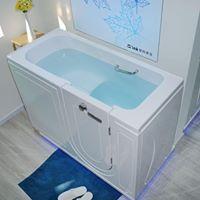
Is there anyone intersted in obtaining a set of safe walk-in bathtub,  a wide range of bathtub is available in variable features, such as fundamental soaking tub,  with seat&back heat to keep ware while the tub is being filled,  bubble massage, waterjet massage, 

Walk in bathtub is very popular in the united states for the elderly folks, or anyone with handicapped mobility,   the tub has a swing door allows for easy entry and exit, according to survey, over 80% of the critical fall for elderly people happen in bathroom. 

Create an account or sign in to comment

Account

Navigation

Search

Search

Configure browser push notifications

Chrome (Android)
  1. Tap the lock icon next to the address bar.
  2. Tap Permissions → Notifications.
  3. Adjust your preference.
Chrome (Desktop)
  1. Click the padlock icon in the address bar.
  2. Select Site settings.
  3. Find Notifications and adjust your preference.