


Leaderboard
-
gallopingpenguin
Members1Points36Posts -
bro
Verified Merchant1Points1453Posts -
Luxexplorer
Members1Points365Posts

Popular Content
Showing content with the highest reputation on 03/11/16 in all areas
-
1 pointHey Rynaed! Poppin to your blog to have a look after you left the note on mine that you are also not having a gate. I love your old main door actually and if the condition is good I would have get the contractor to send down and repaint it. I was looking for your kind of door in white so that I can have it painted but only found what I have now which is in wood color. The only thing we did was we requested the door to remain unvarnished and that is the most "raw" form we can find. Congrats to your new place and I love the space your new home offers.1 point
-
Hehe, thanks Rynaed, we looooove those 2 items too!!! Can't wait to display our taobao-ed frames and have dinner parties around the island Went to snoop and really LOVE your idea of a pegboard in the kitchen!1 point
-
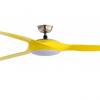
1 pointHi Fellow Formers and Friends... This is the new model which alot of fellow formers and friends that has been asking me about, its sleek and nice that comes with LED light..... Size of fan : 56 inches Material of blades : Acrylic blades Number of blades : 5 Wattage of LED : 18W Also A VERI BIG THANK YOU for the continuous support from you… With this encouragement... Ill continue to give my very best in the coming years to meet your needs and requirements... For those who need more info on lobangs/quotes for ceiling fans, down lights (Normal, LED) …etc. You can always PM me or email me salecfan@yahoo.com.sg..... Dun forget about the kopi treat ya.... :dribble: :wub: pals1 point
This leaderboard is set to Singapore/GMT+08:00