


Leaderboard

Popular Content
Showing content with the highest reputation on 06/19/17 in all areas
-
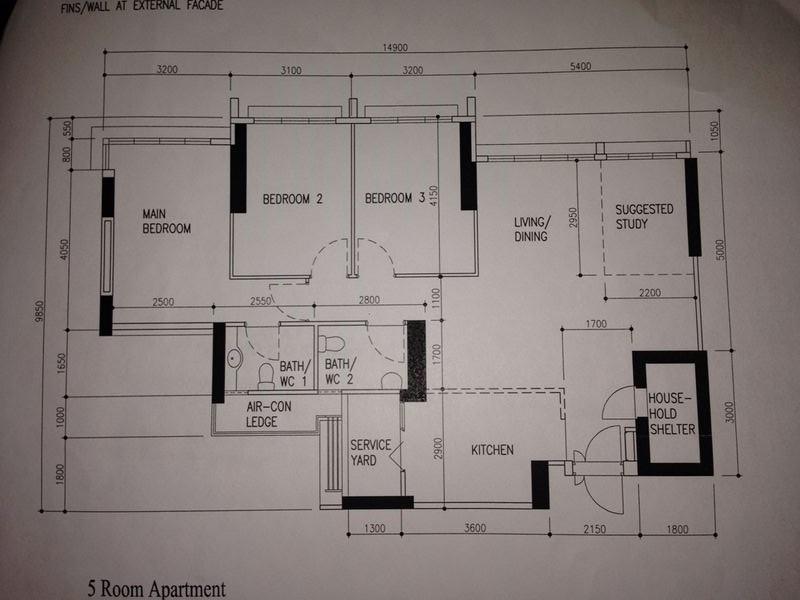
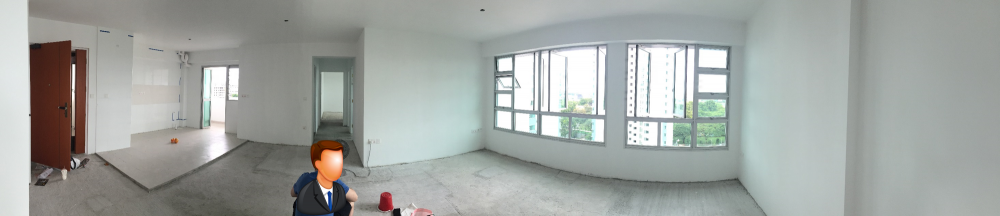
Hello fellow home owners! Mr Z (aka The Boss) and I (aka The Secretary) have been silent readers of this community for quite awhile and started stalking t-blogs since 4 years ago (ever since we applied for our flat)! However, we have only started to be more "hardworking" in sourcing for ideas, concepts and IDs / contractors 2 years ago. We have learnt much from all the valuable sharings from this blog, and would also like to contribute our bits. Our BTO is located in Ang Mo Kio, and it is the first BTO that offered a open concept kitchen. Open concept kitchen means a bigger living room space without having to hack any walls. Sounds good, and so we opted for it But, this option has also resulted in many of our sleepless nights (trying to crack our heads for ideas on how to prevent cooking smells from the rest of the house) for the past 2 years Here's the floor plan: We received the keys in end January this year, a week before CNY. Here's a picture of our house (Can you spot The Boss in this picture? ) The whole renovation process took us 3 months, not inclusive of the delivery of our furniture. We must admit that it took a lot of time and effort to build a house to turn out the way we would like it to be (and also to make our hard-earned $$ worthwhile); nonethless a beautiful and enjoyable experience that we would not regret when we looked back now. If you would like to read more about our reno journey, do stay tuned for the next update! - The Boss and The Secretary
 1 point
-
1 point
This leaderboard is set to Singapore/GMT+08:00