


Leaderboard
-
BunniBoi
Members1Points202Posts

Popular Content
Showing content with the highest reputation on 03/09/20 in all areas
-
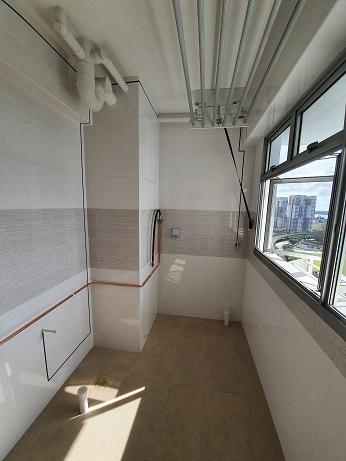
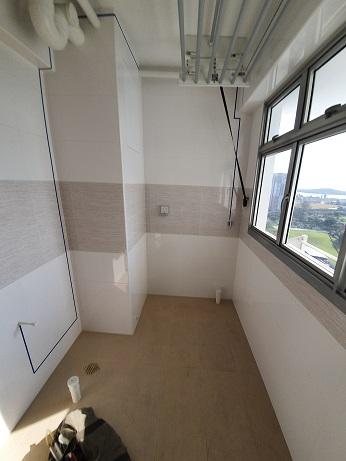
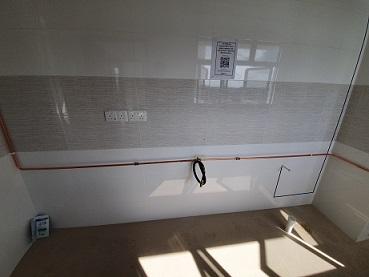
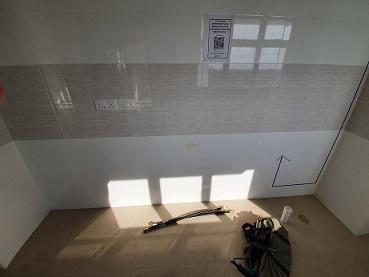
1 pointDefect checks and City Gas Piping Defect Checking I have arranged with my ID to do the defect check on 27 Feb. I believe she will know what and where to lookout for potential defects. At the same time, she can do some actual measurement of the physical place to finalise the dimension for the carpentry works. I have also arranged City Gas to do their site recce on 27 Feb as well. Trying to kill 2 birds with one stone (limited annual leave so must fully maximise the it). After my ID done with the defect checking and measured the actual space for the carpentry works, she told me that the carpentry, furniture and appliances position are according to what she has planned. There isn’t any major defect/modification require, except for the carpentry work at my living room and shower screen for bathroom, which I’m thinking of changing the door for my bedroom and re-position the shower screen in my toilet. Running of Gas pipes for Hob and Dryer After we have identified the location for the Hob and the Dryer, we have agreed that the pipes should run downwards, as we have cabinet that able to cover the pipes away. To run the gas pipes, I must arrange another appointment with City Gas. This is how it look like after the pipes are put in-place for my Hob and Dryer. Before / After Hob Area Dryer Area Previous Topic Next Topic Back to Content Page
 1 point
This leaderboard is set to Singapore/GMT+08:00