


Leaderboard
-
Norman Ng
Members1Points42Posts

Popular Content
Showing content with the highest reputation on 10/24/20 in all areas
-
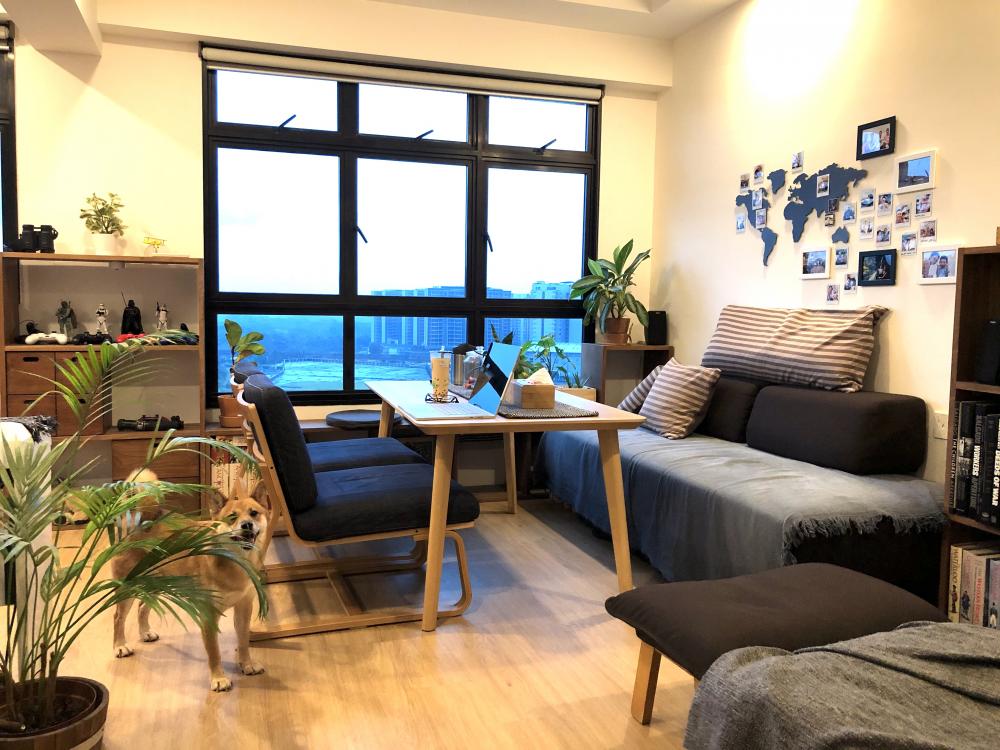
The latest addition/change in my living room is to get rid of my coffee table and to use a permanent dining table instead. It's a smallish table from IKEA, very minimalist that I like. Also changed a single seater couch to a 2 seat Muji living/dining chair configuration. Since the Muji chairs are a little lower, I had to saw about 10 cm off the legs of the table to make the combo more comfortable. I like the configuration a lot. It gives me a place to eat, work and entertain guests without having to wheel the expandable table out every time. The Muji chairs also tuck nicely underneath when not in use. So far the house is holding up well after about 1.5 years. Some little repairs and upkeep needed, nothing major. Hope it stays that way! Hope everyone is keeping safe and healthy during this trying COVID times. As you can see I got a little companion to ease the pain a little haha.
 1 point
This leaderboard is set to Singapore/GMT+08:00