


Leaderboard

Popular Content
Showing content with the highest reputation on 06/23/21 in all areas
-
1 pointMosquitoes and Other Flying Insects My family complained that there are lots of mosquitoes flying into the home. I realised that they were mainly coming in from the toilet windows. So I did something. You can buy the net from FairPrice and mounting tape from anywhere (I bought online). After I did the above, my wife complained that the screen was non-removeable. So, I had to redo. I bought the frames online from ezbuy. DIY Magnetic Screen - https://s.click.aliexpress.com/e/_ADeCfz DIY Velco Screen - https://s.click.aliexpress.com/e/_9IuTCb1 point
-
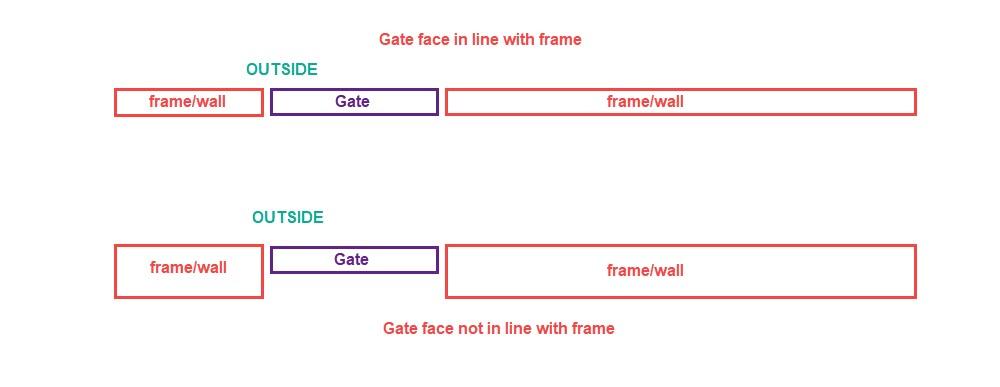
1 pointbefore deciding on which rim lock to buy, look at the design of your side gate and the frame/wall first. if your side gate and frame/wall has the faces in line with each other(on the inside), then the Viro or Cisa lock which AWS recommended would work. but if you have gate which has its face not in line with the frame/wall, then the Cisa lock which AWS recommended can't work since you can't mount the strike at the side of the gate frame or wall. Even for the Viro rim lock, you will have to find creative ways to mount the strike plate as well. for my house, the gate and frame/wall is not in line so I had to do some modifications for the rim lock to work properly.
 1 point
This leaderboard is set to Singapore/GMT+08:00