Skip to content
View in the app

A better way to browse. Learn more.

RenoTalk.com ™

A full-screen app on your home screen with push notifications, badges and more.

To install this app on iOS and iPadOS
  1. Tap the Share icon in Safari
  2. Scroll the menu and tap Add to Home Screen.
  3. Tap Add in the top-right corner.
To install this app on Android
  1. Tap the 3-dot menu (⋮) in the top-right corner of the browser.
  2. Tap Add to Home screen or Install app.
  3. Confirm by tapping Install.

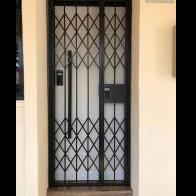
Latest Epic 5G Digital Lock Bundle at $799 Free installation

Featured Replies

First New launch for Epic Digital lock in 2019 ????

Five Greatest Features

1. Unlock using Bluetooth (keywe app)

2. Unlock using Wi-Fi using bridge at $50

3. 100 fingerprint

4. Up to 100 card, 4 given

5.Password

Mobile app Features

A) Time attendance

B) Invite guest give guest code

C) Smart open when you walk near the digital lock

Able to delete individual fingerprint and card .

With 1+2 years warranty


Unlock both door and gate using mobile phone or fingerprint ???

Top up $50 for Wi-Fi bridge otherwise Bluetooth feature is included in the latest epic digital lock

Now you can unlock using 4G smartphone with ?????

Less $100 for Any My President Hotel Quality Mattress from $799 onwards with Purchase of Digital Lock https://mypresidentmattress.com/

Free Delivery worth $150,

Deliver within 24 Hours, endorse by most Singapore celebrities

Order Now and get it today 96177025 Leon (24/7) speak English and Mandarin

Call our Mobile Showroom and we will drive to show you today ???

Free Taxi Rebate (Twice the amount) with Any Purchase ??

?: http://firerateddoor.com.sg

?:10 arumugam road #08-10 , LTC building A

?: 96177025 Leon (24/7)

#HDBDoor #Firerateddoor #laminatedoor #bedroomdoor #maindoor #condodoor #btodoor #veneerdoor #doorfactory #cheapestdoor #hdbgate #mildsteelgate #wroughtirongate #firerateddoor #digitallock #samsungdigitallock #epicdigitallock #keywedigitallock #gatemandigitallock #samsungdr708digitallock #Samsungdr738digitallock #cheapestdigitallock #digitaldoorlock #toiletdoor #koreadigitallock #homeautomation #latestdigitallock #MYDIGITALLOCK #gatedigitallock #pushpulldigitallock #locksmithdigitallock #breakdigitallock #installationservicesdigitallock

0e021bca-1853-4e93-a0ba-=-.jpg

0e021bca-1853-4e93-a0ba-d194f23fc024-.jpg

52363102_2572928892748209_3967266496815562752_n.jpg

56664726_2672246482816449_8914168016841736192_n.jpg

56835741_2674326129275151_6158129013857452032_n.jpg

57311658_2707537289287368_7136693044023132160_n.jpg

57484621_2707536722620758_3963750756846141440_n.jpg

58663942_2721769124530851_7169971425590116352_n.jpg

60014682_2755984687775961_8973245094429720576_n.jpg


Create an account or sign in to comment

Account

Navigation

Search

Search

Configure browser push notifications

Chrome (Android)
  1. Tap the lock icon next to the address bar.
  2. Tap Permissions → Notifications.
  3. Adjust your preference.
Chrome (Desktop)
  1. Click the padlock icon in the address bar.
  2. Select Site settings.
  3. Find Notifications and adjust your preference.