Skip to content
View in the app

A better way to browse. Learn more.

RenoTalk.com ™

A full-screen app on your home screen with push notifications, badges and more.

To install this app on iOS and iPadOS
  1. Tap the Share icon in Safari
  2. Scroll the menu and tap Add to Home Screen.
  3. Tap Add in the top-right corner.
To install this app on Android
  1. Tap the 3-dot menu (⋮) in the top-right corner of the browser.
  2. Tap Add to Home screen or Install app.
  3. Confirm by tapping Install.

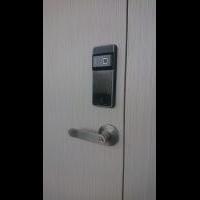
Mazi Push Pull Digital Lock at $400 (delivery) call 91616282

Featured Replies

Looking for Latest Korea Push Pull Digital Lock but over budget?

? Here i recommend you this Designer Push Pull Digital Lock at $400 will delivery to your place in Singapore!

? Hurry up! Limited Stock only ! Is time for you to get Digital Lock now?

Mazi Push Pull Digital Lock?

5 Greatest Function

?Pin

?Fingerprint

?RFID Card

?Bluetooth

?WiFi (add $50 for wifi bridge)

Comes with 6 month warranty?

Call I Whatsapp I SMS me Today 9161 6282 and deliver with 48 hours?(FREE)

Mazi Push Pull is suitable for Condo and HDB MainDoor in Singapore?

For more promotion visit https://mydigitallock2018.com.sg/ When you purchase, you will receive

1. $50 Discount on Digital Lock

2. $100 Discount on HDB Main Door

3. $50 Discount on HDB Bedroom Door

4. $100 Discount on My President Mattress

5. $50 Discount Bi-Fold Toilet Door

6. $50 Discount on HDB Gate

7. $50 Discount for EPIC Gate Digital Lock


5298c1ed-aef8-46e9-8f60-ca51e1ac3150.jpg

Create an account or sign in to comment

Account

Navigation

Search

Search

Configure browser push notifications

Chrome (Android)
  1. Tap the lock icon next to the address bar.
  2. Tap Permissions → Notifications.
  3. Adjust your preference.
Chrome (Desktop)
  1. Click the padlock icon in the address bar.
  2. Select Site settings.
  3. Find Notifications and adjust your preference.