


Skip to content
View in the app

A better way to browse. Learn more.

RenoTalk.com ™

A full-screen app on your home screen with push notifications, badges and more.

To install this app on iOS and iPadOS
  1. Tap the Share icon in Safari
  2. Scroll the menu and tap Add to Home Screen.
  3. Tap Add in the top-right corner.
To install this app on Android
  1. Tap the 3-dot menu (⋮) in the top-right corner of the browser.
  2. Tap Add to Home screen or Install app.
  3. Confirm by tapping Install.

elimcs

Members
  • Joined

  • Last visited

Everything posted by elimcs

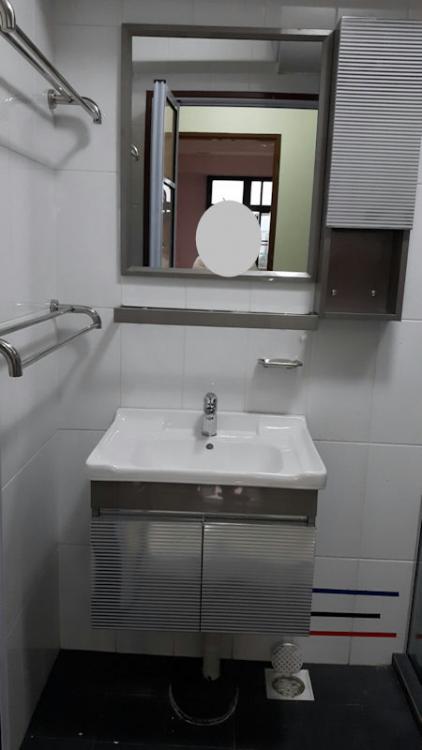
  1. Hi All, Accidentally bought 2 extra set of Toilet Vanity - measure as 60 cm in width. Item are brand new, was opened to check condition. The items is exactly same as picture, Basin with vanity cabinet, mirror, side cabinet and glass panel. Selling at $150 per set, self collection at my place - Clementi.
  2. Hi Bro, I am looking to install ceiling fans for new bto, bedroom, dining area and living room. Can give some recommendation? Thanks
  3. Hi Ivy1981, Can send me the list also, will be getting my key next month? eddie.limcs@yahoo.com Thanks in advance.
  4. Hi, anyone use topmount from kraus https://www.amazon.com/Kraus-KTM32-Topmount-Stainless-Kitchen/dp/B006ZTELYQ/ref=sr_1_4?ie=UTF8&qid=1481957589&sr=8-4&keywords=kraus+topmount+sink
  5. Can tell exactly each model did you bought? Is the tap hole size fit for Singapore? Thanks
  6. Can tell exactly each model did you bought? Is the tap hole size fit for Singapore? Thanks
  7. Hi Reiken, Can share with me J and E contact/email and quote? Thank you. elimcs
  8. Hi Jimmya, Can you pm share your ID contact. Thanks.
  9. Hello, can share your contractor details with me?
  10. Hi, can share your contractor details with me?
  11. Hi, Can share your contractor details with me? Thanks elimcs

Account

Navigation

Search

Search

Configure browser push notifications

Chrome (Android)
  1. Tap the lock icon next to the address bar.
  2. Tap Permissions → Notifications.
  3. Adjust your preference.
Chrome (Desktop)
  1. Click the padlock icon in the address bar.
  2. Select Site settings.
  3. Find Notifications and adjust your preference.